5 MLM, 2-levels: Pupil Popularity

Download/install a new GitHub package
Load/activate these packages
library(haven)
library(tidyverse)
library(flextable)
library(apaSupp)      # Not on CRAN, on GitHub (see above)
library(performance)
library(lme4)
library(lmerTest)
library(insight)
library(interactions)
library(effects)
library(sjPlot)
5.1 Background
The text “Multilevel Analysis: Techniques and Applications, Third Edition” (Hox et al. 2017) has a companion website which includes links to all the data files used throughout the book (housed on the book’s GitHub repository).
The following example is used through out (Hox et al. 2017)’s chapater 2.
From Appendix E:
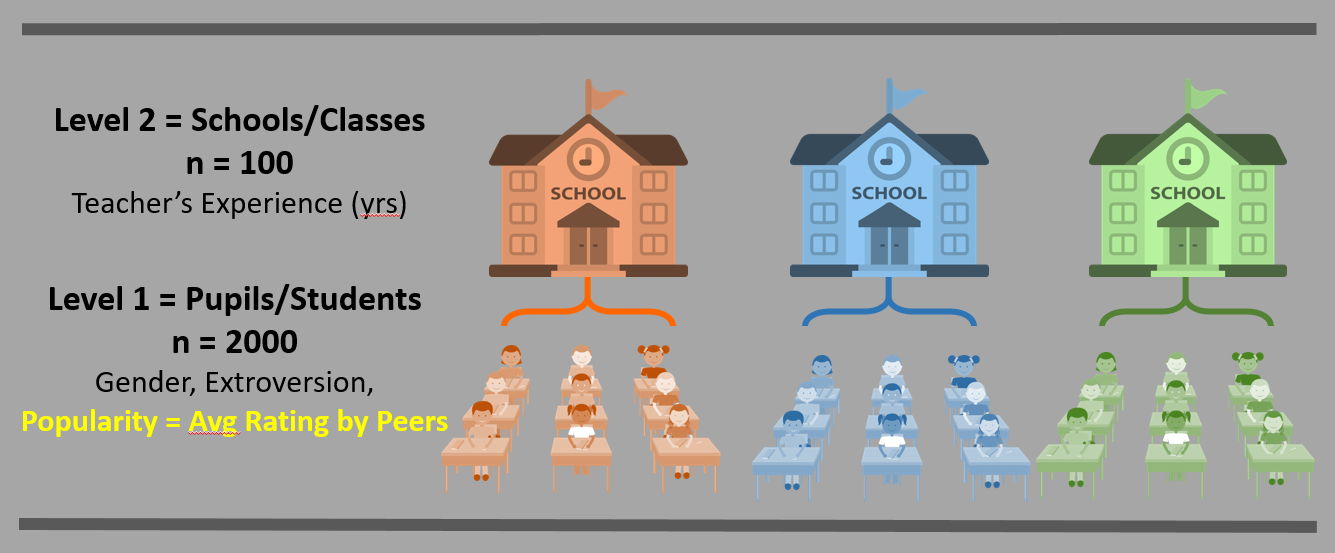
The popularity data in popular2.sav are simulated data for 2000 pupils (
pupil) in 100 schools (class). The purpose is to offer a very simple example for multilevel regression analysis.The main OUTCOME or DEPENDENT VARIABLE (DV) is the pupil popularity, a popularity rating on a scale of 1-10 derived by a sociometric procedure. Typically, a sociometric procedure asks all pupils in a class to rate all the other pupils, and then assigns the average received popularity rating to each pupil (
pupular). Because of the sociometric procedure, group effects as apparent from higher level variance components are rather strong. There is a second outcome variable, pupil popularity as rated by their teacher (popteach), on a scale from 1-10.The PREDICTORS or INDEPENDENT VARIABLES (IVs) are:
pupil gender (
sex) only two levels: boy = 0, girl = 1pupil extroversion (
extrav) 10-point scale (whole number) as rated by the teacher, higher values correspond to more extrovertedteacher experience (
texp) in years, reported as a whole numberThe popularity data have been generated to be a ‘nice’ well-behaved data set: the sample sizes at both levels are sufficient, the residuals have a normal distribution, and the multilevel effects are strong.
Note: We will ignore the centered and standardized variables, which start with a capital Z or C.
Rows: 2,000
Columns: 15
$ pupil     <dbl> 1, 2, 3, 4, 5, 6, 7, 8, 9, 10, 11, 12, 13, 14, 15, 16, 17, 1…
$ class     <dbl> 1, 1, 1, 1, 1, 1, 1, 1, 1, 1, 1, 1, 1, 1, 1, 1, 1, 1, 1, 1, …
$ extrav    <dbl> 5, 7, 4, 3, 5, 4, 5, 4, 5, 5, 5, 5, 5, 5, 5, 6, 4, 4, 7, 4, …
$ sex       <dbl+lbl> 1, 0, 1, 1, 1, 0, 0, 0, 0, 0, 1, 1, 0, 1, 1, 1, 0, 0, 1,…
$ texp      <dbl> 24, 24, 24, 24, 24, 24, 24, 24, 24, 24, 24, 24, 24, 24, 24, …
$ popular   <dbl> 6.3, 4.9, 5.3, 4.7, 6.0, 4.7, 5.9, 4.2, 5.2, 3.9, 5.7, 4.8, …
$ popteach  <dbl> 6, 5, 6, 5, 6, 5, 5, 5, 5, 3, 5, 5, 5, 6, 5, 5, 2, 3, 7, 4, …
$ Zextrav   <dbl> -0.1703149, 1.4140098, -0.9624772, -1.7546396, -0.1703149, -…
$ Zsex      <dbl> 0.9888125, -1.0108084, 0.9888125, 0.9888125, 0.9888125, -1.0…
$ Ztexp     <dbl> 1.48615283, 1.48615283, 1.48615283, 1.48615283, 1.48615283, …
$ Zpopular  <dbl> 0.88501327, -0.12762911, 0.16169729, -0.27229230, 0.66801848…
$ Zpopteach <dbl> 0.66905609, -0.04308451, 0.66905609, -0.04308451, 0.66905609…
$ Cextrav   <dbl> -0.215, 1.785, -1.215, -2.215, -0.215, -1.215, -0.215, -1.21…
$ Ctexp     <dbl> 9.737, 9.737, 9.737, 9.737, 9.737, 9.737, 9.737, 9.737, 9.73…
$ Csex <dbl> 0.5, -0.5, 0.5, 0.5, 0.5, -0.5, -0.5, -0.5, -0.5, -0.5, 0.5,…tibble [2,000 × 15] (S3: tbl_df/tbl/data.frame)
$ pupil : num [1:2000] 1 2 3 4 5 6 7 8 9 10 ...
..- attr(*, "label")= chr "pupil ident"
..- attr(*, "format.spss")= chr "F4.0"
$ class : num [1:2000] 1 1 1 1 1 1 1 1 1 1 ...
..- attr(*, "label")= chr "class ident"
..- attr(*, "format.spss")= chr "F4.0"
$ extrav : num [1:2000] 5 7 4 3 5 4 5 4 5 5 ...
..- attr(*, "label")= chr "extraversion"
..- attr(*, "format.spss")= chr "F8.0"
$ sex : dbl+lbl [1:2000] 1, 0, 1, 1, 1, 0, 0, 0, 0, 0, 1, 1, 0, 1, 1, 1, 0, 0,...
..@ label : chr "pupil sex"
..@ format.spss: chr "F2.0"
..@ labels : Named num [1:2] 0 1
.. ..- attr(*, "names")= chr [1:2] "boy" "girl"
$ texp : num [1:2000] 24 24 24 24 24 24 24 24 24 24 ...
..- attr(*, "label")= chr "teacher experience in years"
..- attr(*, "format.spss")= chr "F3.0"
$ popular : num [1:2000] 6.3 4.9 5.3 4.7 6 4.7 5.9 4.2 5.2 3.9 ...
..- attr(*, "label")= chr "popularity sociometric score"
..- attr(*, "format.spss")= chr "F8.1"
$ popteach : num [1:2000] 6 5 6 5 6 5 5 5 5 3 ...
..- attr(*, "label")= chr "popularity teacher evaluation"
..- attr(*, "format.spss")= chr "F8.1"
$ Zextrav : num [1:2000] -0.17 1.414 -0.962 -1.755 -0.17 ...
..- attr(*, "label")= chr "Zscore: extraversion"
..- attr(*, "format.spss")= chr "F8.2"
$ Zsex : num [1:2000] 0.989 -1.011 0.989 0.989 0.989 ...
..- attr(*, "label")= chr "Zscore: pupil sex"
..- attr(*, "format.spss")= chr "F8.2"
$ Ztexp : num [1:2000] 1.49 1.49 1.49 1.49 1.49 ...
..- attr(*, "label")= chr "Zscore: teacher experience in years"
..- attr(*, "format.spss")= chr "F8.2"
$ Zpopular : num [1:2000] 0.885 -0.128 0.162 -0.272 0.668 ...
..- attr(*, "label")= chr "Zscore: popularity sociometric score"
..- attr(*, "format.spss")= chr "F8.2"
$ Zpopteach: num [1:2000] 0.6691 -0.0431 0.6691 -0.0431 0.6691 ...
..- attr(*, "label")= chr "Zscore: popularity teacher evaluation"
..- attr(*, "format.spss")= chr "F8.2"
$ Cextrav : num [1:2000] -0.215 1.785 -1.215 -2.215 -0.215 ...
..- attr(*, "label")= chr "extrav centered"
..- attr(*, "format.spss")= chr "F6.2"
..- attr(*, "display_width")= int 9
$ Ctexp : num [1:2000] 9.74 9.74 9.74 9.74 9.74 ...
..- attr(*, "label")= chr "texp centered"
..- attr(*, "format.spss")= chr "F6.2"
$ Csex : num [1:2000] 0.5 -0.5 0.5 0.5 0.5 -0.5 -0.5 -0.5 -0.5 -0.5 ...
..- attr(*, "label")= chr "sex centered on .5 (theoretical value)"
..- attr(*, "format.spss")= chr "F6.1"
- attr(*, "label")= chr " SPSS/PC+"5.1.1 Unique Identifiers
We will restrict ourselves to a few of the variables and create a unique identifier variable for each student.
df_pop <- df_raw %>%
  haven::as_factor() %>%                   # retain the labels from SPSS --> factor
  haven::zap_label() %>%                   # drop the varaible labels from SPSS
  dplyr::mutate(id = paste(class, pupil,
                           sep = "_") %>%   # create a unique id for each student (char)
                  factor()) %>%             # declare id is a factor
  dplyr::mutate(sex = sex %>%
                  forcats::fct_recode("Boy" = "boy",
                                      "Girl" = "girl")) %>%
  dplyr::select(id, pupil:popteach)         # reduce the variables included

tibble::glimpse(df_pop)
Rows: 2,000
Columns: 8
$ id <fct> 1_1, 1_2, 1_3, 1_4, 1_5, 1_6, 1_7, 1_8, 1_9, 1_10, 1_11, 1_12…
$ pupil <dbl> 1, 2, 3, 4, 5, 6, 7, 8, 9, 10, 11, 12, 13, 14, 15, 16, 17, 18…
$ class <dbl> 1, 1, 1, 1, 1, 1, 1, 1, 1, 1, 1, 1, 1, 1, 1, 1, 1, 1, 1, 1, 2…
$ extrav <dbl> 5, 7, 4, 3, 5, 4, 5, 4, 5, 5, 5, 5, 5, 5, 5, 6, 4, 4, 7, 4, 8…
$ sex <fct> Girl, Boy, Girl, Girl, Girl, Boy, Boy, Boy, Boy, Boy, Girl, G…
$ texp <dbl> 24, 24, 24, 24, 24, 24, 24, 24, 24, 24, 24, 24, 24, 24, 24, 2…
$ popular <dbl> 6.3, 4.9, 5.3, 4.7, 6.0, 4.7, 5.9, 4.2, 5.2, 3.9, 5.7, 4.8, 5…
$ popteach <dbl> 6, 5, 6, 5, 6, 5, 5, 5, 5, 3, 5, 5, 5, 6, 5, 5, 2, 3, 7, 4, 6…5.1.2 Structure and Variables
Its a good idea to visually inspect the first few lines in the datast to get a sense of how it is organized.
df_pop %>%
  psych::headTail(top = 25, bottom = 5) %>%
  flextable::flextable() %>%
apaSupp::theme_apa(caption = "Partial Data Printout in Long Format")id | pupil | class | extrav | sex | texp | popular | popteach |
|---|---|---|---|---|---|---|---|
1_1 | 1 | 1 | 5 | Girl | 24 | 6.3 | 6 |
1_2 | 2 | 1 | 7 | Boy | 24 | 4.9 | 5 |
1_3 | 3 | 1 | 4 | Girl | 24 | 5.3 | 6 |
1_4 | 4 | 1 | 3 | Girl | 24 | 4.7 | 5 |
1_5 | 5 | 1 | 5 | Girl | 24 | 6 | 6 |
1_6 | 6 | 1 | 4 | Boy | 24 | 4.7 | 5 |
1_7 | 7 | 1 | 5 | Boy | 24 | 5.9 | 5 |
1_8 | 8 | 1 | 4 | Boy | 24 | 4.2 | 5 |
1_9 | 9 | 1 | 5 | Boy | 24 | 5.2 | 5 |
1_10 | 10 | 1 | 5 | Boy | 24 | 3.9 | 3 |
1_11 | 11 | 1 | 5 | Girl | 24 | 5.7 | 5 |
1_12 | 12 | 1 | 5 | Girl | 24 | 4.8 | 5 |
1_13 | 13 | 1 | 5 | Boy | 24 | 5 | 5 |
1_14 | 14 | 1 | 5 | Girl | 24 | 5.5 | 6 |
1_15 | 15 | 1 | 5 | Girl | 24 | 6 | 5 |
1_16 | 16 | 1 | 6 | Girl | 24 | 5.7 | 5 |
1_17 | 17 | 1 | 4 | Boy | 24 | 3.2 | 2 |
1_18 | 18 | 1 | 4 | Boy | 24 | 3.1 | 3 |
1_19 | 19 | 1 | 7 | Girl | 24 | 6.6 | 7 |
1_20 | 20 | 1 | 4 | Boy | 24 | 4.8 | 4 |
2_1 | 1 | 2 | 8 | Girl | 14 | 6.4 | 6 |
2_2 | 2 | 2 | 4 | Boy | 14 | 2.4 | 3 |
2_3 | 3 | 2 | 6 | Boy | 14 | 3.7 | 4 |
2_4 | 4 | 2 | 5 | Girl | 14 | 4.4 | 4 |
2_5 | 5 | 2 | 5 | Girl | 14 | 4.3 | 4 |
... | ... | ... | ... | ... | ... | ||
100_16 | 16 | 100 | 4 | Girl | 7 | 4.3 | 5 |
100_17 | 17 | 100 | 4 | Boy | 7 | 2.6 | 2 |
100_18 | 18 | 100 | 8 | Girl | 7 | 6.7 | 7 |
100_19 | 19 | 100 | 5 | Boy | 7 | 2.9 | 3 |
100_20 | 20 | 100 | 9 | Boy | 7 | 5.3 | 5 |
Visual inspection reveals that most of the variables are measurements at level 1 and apply to specific pupils (extrav, sex, popular, and popteach), while the teacher’s years of experience is a level 2 variable since it applies to the entire class. Notice how the texp variable is identical for all pupils in the same class. This is call Disaggregated data.
5.2 Exploratory Data Analysis
5.2.1 Summarize Descriptive Statistics
5.2.1.1 The apaSupp package
Most posters, journal articles, and reports start with a table of descriptive statistics. Since it tends to come first, this type of table is often referred to as Table 1.
df_pop %>%
  dplyr::select(sex,
                "Teacher's Experience"  = texp,
                "Pupil's Extroversion"   = extrav,
                "Pupil's Popularity" = popular) %>%
apaSupp::tab_desc(caption = "Descriptive Summary of Key Continuous Variables")NA | M | SD | min | Q1 | Mdn | Q3 | max | |
|---|---|---|---|---|---|---|---|---|
Teacher's Experience | 0 | 14.26 | 6.55 | 2.00 | 8.00 | 15.00 | 20.00 | 25.00 |
Pupil's Extroversion | 0 | 5.21 | 1.26 | 1.00 | 4.00 | 5.00 | 6.00 | 10.00 |
Pupil's Popularity | 0 | 5.08 | 1.38 | 0.00 | 4.10 | 5.10 | 6.00 | 9.50 |
Note. N = 2000. NA = not available or missing; Mdn = median; Q1 = 25th percentile; Q3 = 75th percentile. | ||||||||
df_pop %>%
  dplyr::select(sex,
                "Teacher Experience" = texp,
                "Pupil Extroversion" = extrav,
                "Pupil Popularity"   = popular) %>%
  apaSupp::tab1(split = "sex",
                caption = "Descriptive Summary by Sex",
                p_note = "apa23")
| Total | Boy | Girl | p-value |
|---|---|---|---|---|
Teacher Experience | 14.26 (6.55) | 13.78 (6.28) | 14.73 (6.78) | .001** |
Unknown | 0 | 0 | 0 | |
Pupil Extroversion | 5.22 (1.26) | 5.10 (1.17) | 5.33 (1.34) | < .001*** |
Unknown | 0 | 0 | 0 | |
Pupil Popularity | 5.08 (1.38) | 4.28 (1.14) | 5.85 (1.14) | < .001*** |
Unknown | 0 | 0 | 0 | |
Note. Continuous variables are summarized with means (SD) and significant group differences assessed via independent t-tests. Categorical variables are summarized with counts (%) and significant group differences assessed via Chi-squared tests for independence. | ||||
** p < .01. *** p < .001. | ||||
5.2.2 Visualizations of Raw Data
5.2.2.1 Ignore Clustering
5.2.2.1.1 Scatterplots
For a first look, its useful to plot all the data points on a single scatterplot as displayed in Figure 5.1. Due to granularity in the rating scale, many points end up being plotted on top of each other (overplotted), so its a good idea to use geom_count() rather than geom_point() so the size of the dot can convey the number of points at that location (Wickham et al. 2026).
Disaggregate: pupil level only with extroversion treated as an continuous measure.
# Disaggregate: pupil (level 1) only, ignore level 2's existance
# extroversion treated: continuous measure
df_pop %>%
  ggplot() +
  aes(x = extrav,                                # x-axis variable
      y = popular) +                             # y-axis variable
  geom_count() +                                 # POINTS w/ SIZE = COUNT
  geom_smooth(method = "lm") +                   # linear regression line
  theme_bw() +                                   # white background
  labs(x    = "Pupil Extroversion (10 pt scale)",      # x-axis label
       y    = "Peer Rated Popularity Score",   # y-axis label
       size = "Count") +                         # legend key's title
  theme(legend.position = c(0.9, 0.2),                          # key at
        legend.background = element_rect(color = "black")) +    # key box
  scale_x_continuous(breaks = seq(from = 0, to = 10, by = 1)) + # x-ticks
  scale_y_continuous(breaks = seq(from = 0, to = 10, by = 2))   # y-ticks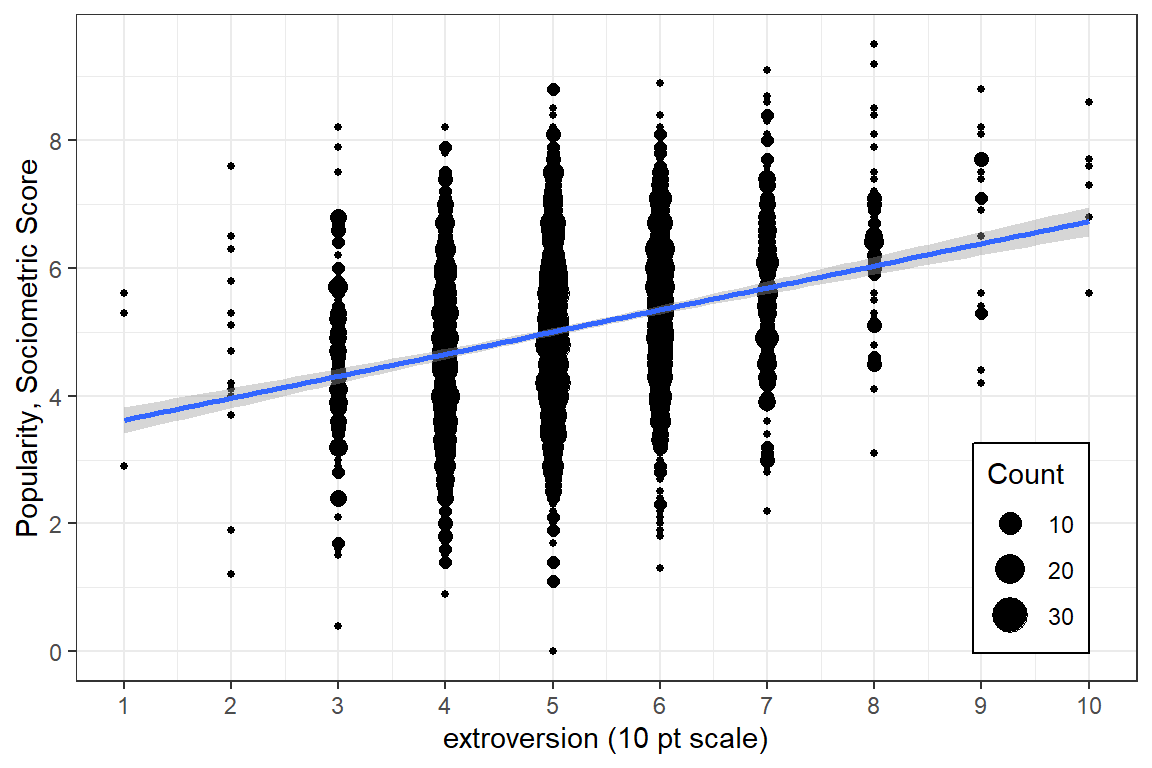
Figure 5.1
Global Association between Pupil Extroversion and Popularity for the Full Sample
5.2.2.1.2 Density Plots
When the degree of overplotting as high as it is in Figure 5.1, it can be useful to represent the data with density contours as seen in Figure ??. I’ve chosen to leave the points displayed in this redition, but color them much lighter so that they are present, but do not detract from the pattern of association.
Disaggregate: pupil level only with extroversion treated as an continuous measure.
df_pop %>%
  ggplot() +
  aes(x = extrav,                                # x-axis variable
      y = popular) +                             # y-axis variable
  geom_count(color = "gray") +                   # POINTS w/ SIZE = COUNT
  geom_density2d() +                             # DENSITY CURVES
  geom_smooth(method = "lm", color = "red") +    # linear regression line
  theme_bw() +                                   # white background
  labs(x    = "Pupil Extroversion (10 pt scale)",      # x-axis label
       y    = "Peer Rated Popularity Score") +    # y-axis label
  guides(size = FALSE)  +                        # don't include a legend
  scale_x_continuous(breaks = seq(from = 0, to = 10, by = 1)) + # x-ticks
  scale_y_continuous(breaks = seq(from = 0, to = 10, by = 2))   # y-ticks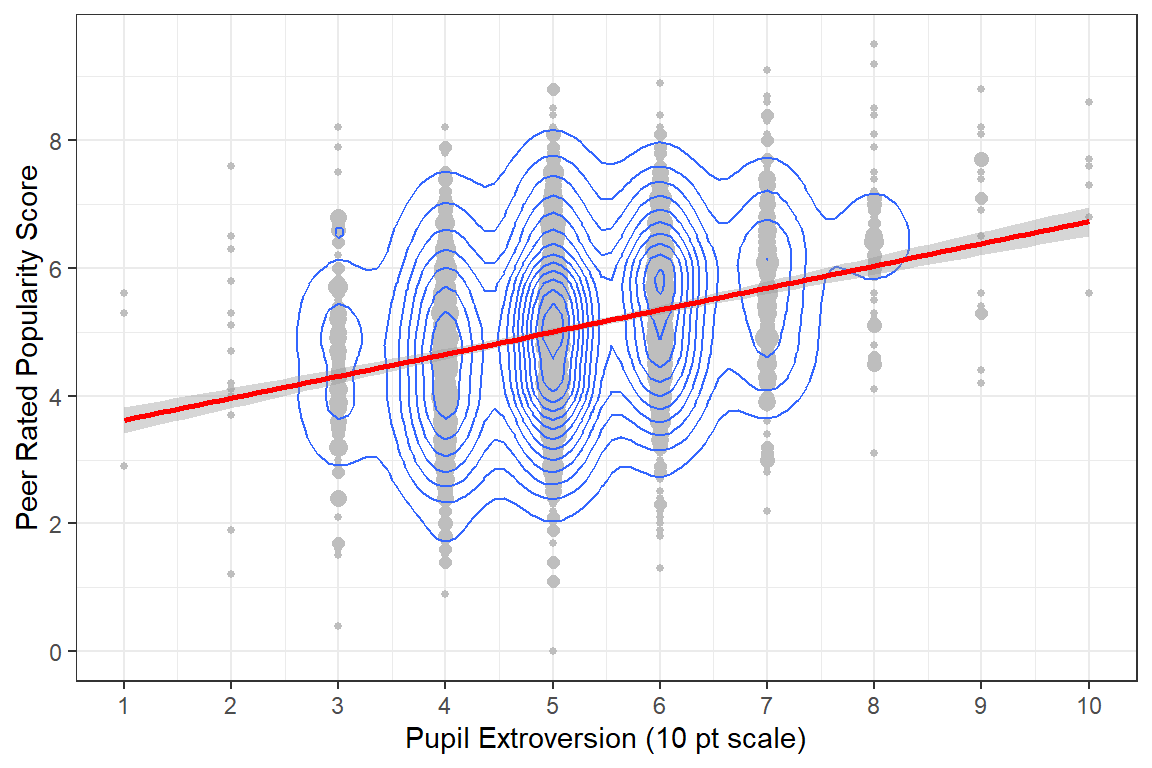
Figure 5.2
Global Association between Pupil Extroversion and Popularity for the Full Sample
5.2.2.1.3 Hexagonal Heat Map
df_pop %>%
  ggplot(aes(x = extrav,                              # x-axis variable
             y = popular)) +                          # y-axis variable
  stat_binhex(colour = "grey85", na.rm  = TRUE) +     # outlines
  scale_fill_gradientn(colors   = c("grey80","navyblue"), # fill color extremes
                       name     = "Frequency",        # legend title
                       na.value = NA) +               # color for count = 0
  labs(x    = "Pupil Extroversion (10 pt scale)",     # x-axis label
       y    = "Peer Rated Popularity Score") +        # y-axis label
  theme_bw()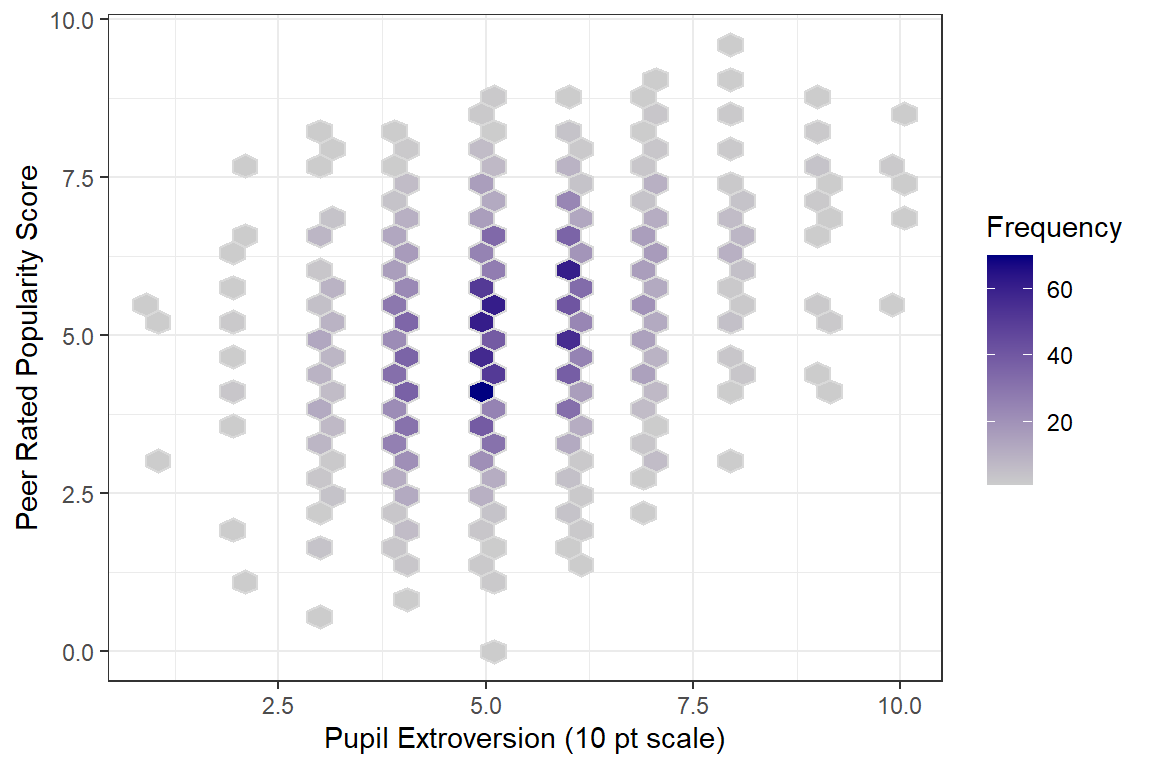
5.2.2.1.4 Histograms, stacked
The argument could be made that the extroversion score should be treated as an ordinal factor instead of as a truly continuous scale since the only valid values are the whole number 1 through 10 and there is no assurance that these category assignments represent a true ratio measurement scale. However, we must keep in mind that this was an observational study, and as such, the number of pupils assignment each level of extroversion is not equal.
# count the number of pupils in assigned each extroversion value, 1:10
df_pop %>%
  dplyr::group_by(extrav) %>%
  dplyr::summarise(Count = n_distinct(id),
                   Percent  = 100 * Count / 2000) %>%
  flextable::flextable() %>%
apaSupp::theme_apa(caption = "Distribution of Peer-Rated Pupil Extroversion")extrav | Count | Percent |
|---|---|---|
1.00 | 3 | 0.15 |
2.00 | 13 | 0.65 |
3.00 | 119 | 5.95 |
4.00 | 423 | 21.15 |
5.00 | 688 | 34.40 |
6.00 | 478 | 23.90 |
7.00 | 194 | 9.70 |
8.00 | 58 | 2.90 |
9.00 | 18 | 0.90 |
10.00 | 6 | 0.30 |
5.2.2.1.5 Boxplots
Figure 5.3 displays the same data as Figure 5.1, but uses boxplots for the distribution of scores at each level of extroversion.
Disaggregate: pupil level only with extroversion treated as an ordinal factor. The width of the boxes are proportional to the square-roots of the number of observations each box represents.
# Disaggregate: pupil (level 1) only, ignore level 2's existance
# extroversion treated: ordinal factor
ggplot(df_pop,                        # dataset's name
       aes(x    = factor(extrav),       # x-axis values - make factor!
           y    = popular,              # y-axis values
           fill = factor(extrav))) +    # makes seperate boxes
  geom_boxplot(varwidth = TRUE) +       # draw boxplots instead of points
  theme_bw() +                          # white background
  guides(fill = FALSE)  +               # don't include a legend
  scale_y_continuous(breaks = seq(from = 0, to = 10, by = 2)) +  # y-ticks
  labs(x = "extroversion (10 pt scale)",                    # x-axis label
       y = "Popularity, Sociometric Score") +               # y-axis label
  scale_fill_brewer(palette = "Spectral", direction = 1)    # select color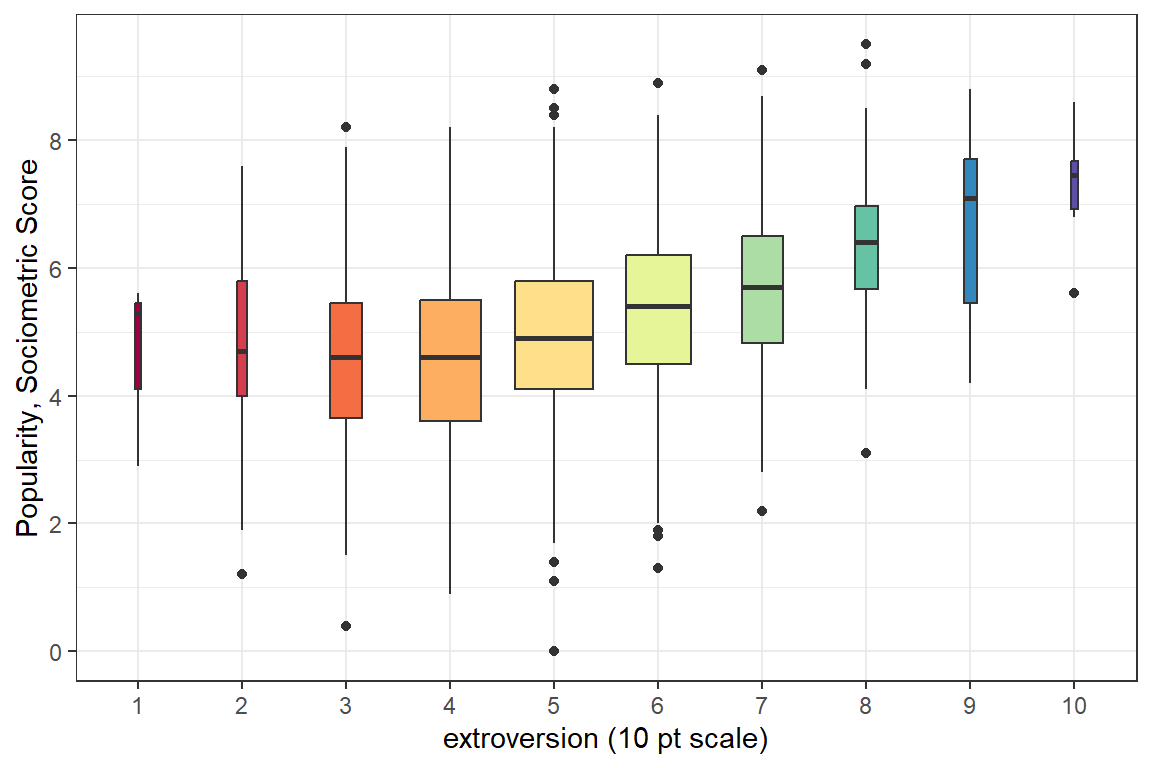
Figure 5.3
Global Association between Pupil Extroversion and Popularity
5.2.3 Consider Clustering
5.2.3.1 Scatterplots
Up to this point, all investigation of this dataset has been only at the pupil level and any nesting or clustering within classes has been ignored. Plotting is a good was to start to get an idea of the class-to-class variability.
Illustration of the degree of class level variability in the association between extroversion and popularity. Each panel represents a class and each point a pupil in that class. First nice classes shown.
# compare the first 9 classrooms becuase all of there are too many at once
df_pop %>%
  dplyr::filter(class <= 9) %>%                  # select ONLY NINE classes
  ggplot(aes(x = extrav,                         # x-axis values
             y = popular)) +                     # y-axis values
  geom_count() +                                 # POINTS w/ SIZE = COUNT
  geom_smooth(method = "lm", color = "red") +    # linear regression line
  theme_bw() +                                   # white background
  labs(x    = "extroversion (10 pt scale)",      # x-axis label
       y    = "Popularity, Sociometric Score",   # y-axis label
       size = "Count") +                         # legend key's title
  guides(size = FALSE)  +                        # don't include a legend
  scale_x_continuous(breaks = seq(from = 0, to = 10, by = 3)) + # x-ticks
  scale_y_continuous(breaks = seq(from = 0, to = 10, by = 3)) + # y-ticks
  facet_wrap(~ class,
             labeller = label_both) +
  theme(strip.background = element_rect(colour = NA,
                                        fill   = NA))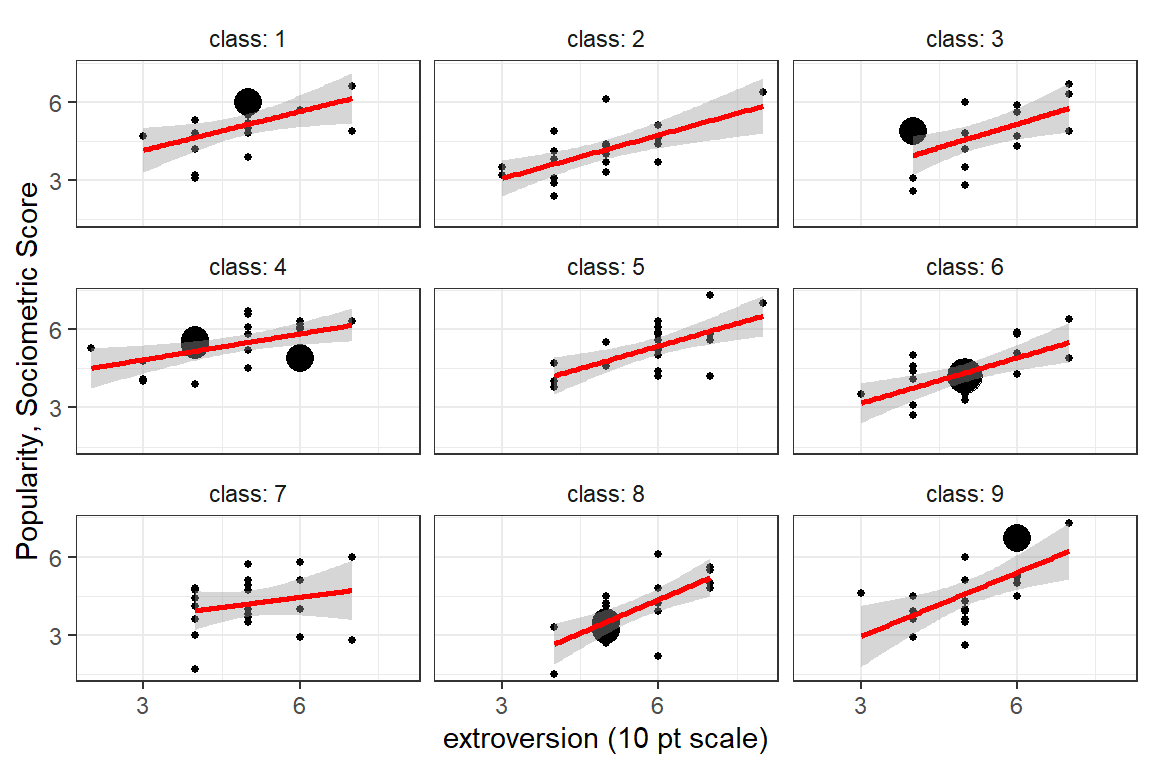
Figure 5.4
Global Association between Pupil Extroversion and Popularity for the First Nine Classes
Illustration of the degree of class level variability in the association between extroversion and popularity. Each panel represents a class and each point a pupil in that class. A set of nine classes was chosen to show a sampling of variability. The facet labels are not shown as the identification number probably would not be advisable for a general publication.
# select specific classes by number for illustration purposes
df_pop %>%
  dplyr::filter(class %in% c(15, 25, 33,
                             35, 51, 64,
                             76, 94, 100)) %>%
  ggplot(aes(x = extrav,                         # x-axis values
             y = popular)) +                     # y-axis values
  geom_count() +                                 # POINTS w/ SIZE = COUNT
  geom_smooth(method = "lm", color = "red") +    # linear regression line
  theme_bw() +                                   # white background
  labs(x    = "extroversion (10 pt scale)",      # x-axis label
       y    = "Popularity, Sociometric Score",   # y-axis label
       size = "Count") +                         # legend key's title
  guides(size = FALSE)  +                        # don't include a legend
  scale_x_continuous(breaks = seq(from = 0, to = 10, by = 3)) + # x-ticks
  scale_y_continuous(breaks = seq(from = 0, to = 10, by = 3)) + # y-ticks
  facet_wrap(~ class)  +
  theme(strip.background = element_blank(),
        strip.text       = element_blank())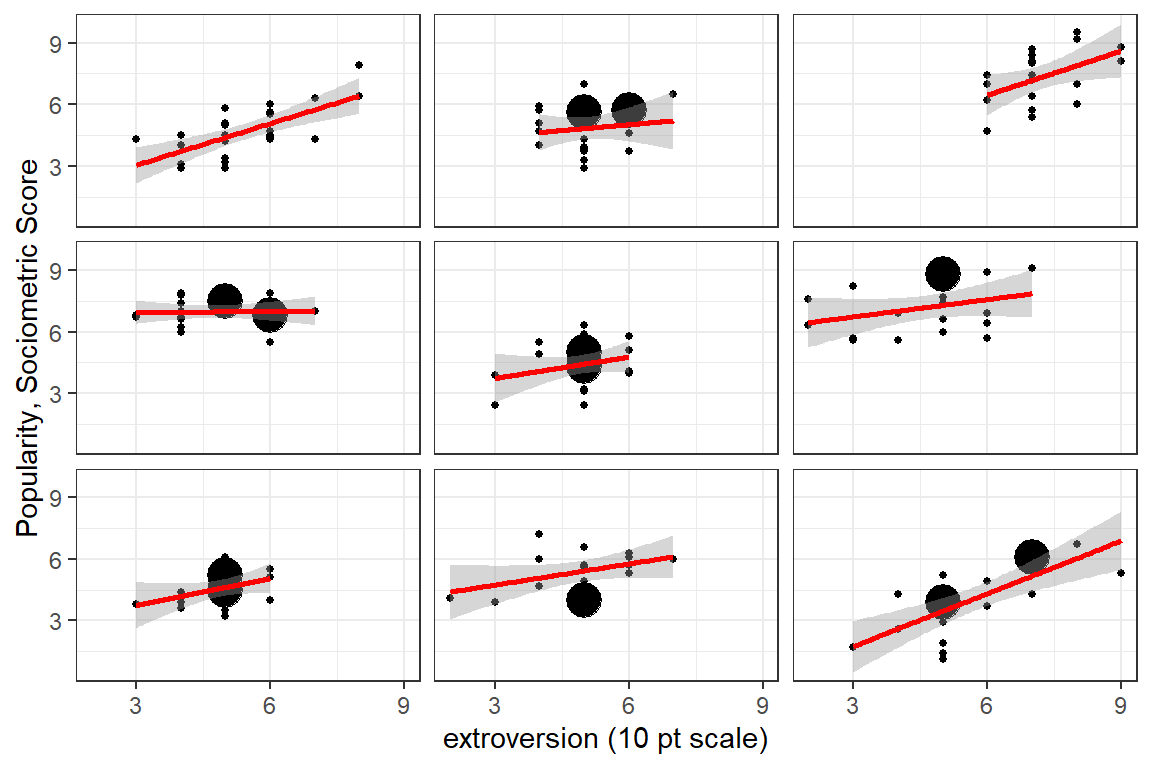
Figure 5.5
Global Association between Pupil Extroversion and Popularity for Nine Extreme Classes
5.2.3.2 Cluster-wise Regression
# compare all 100 classrooms via linear model for each
df_pop %>%
  ggplot(aes(x     = extrav,                      # x-axis values
             y     = popular,                     # y-axis values
             group = class)) +                    # GROUPs for LINES
  geom_smooth(method = "lm",                      # linear regression line
              color  = "gray40",
              size   = 0.4,
              se     = FALSE) +
  theme_bw() +                                   # white background
  labs(x    = "extroversion (10 pt scale)",      # x-axis label
       y    = "Popularity, Sociometric Score") + # y-axis label
  scale_x_continuous(breaks = seq(from = 0, to = 10, by = 2)) + # x-ticks
  scale_y_continuous(breaks = seq(from = 0, to = 10, by = 2))   # y-ticks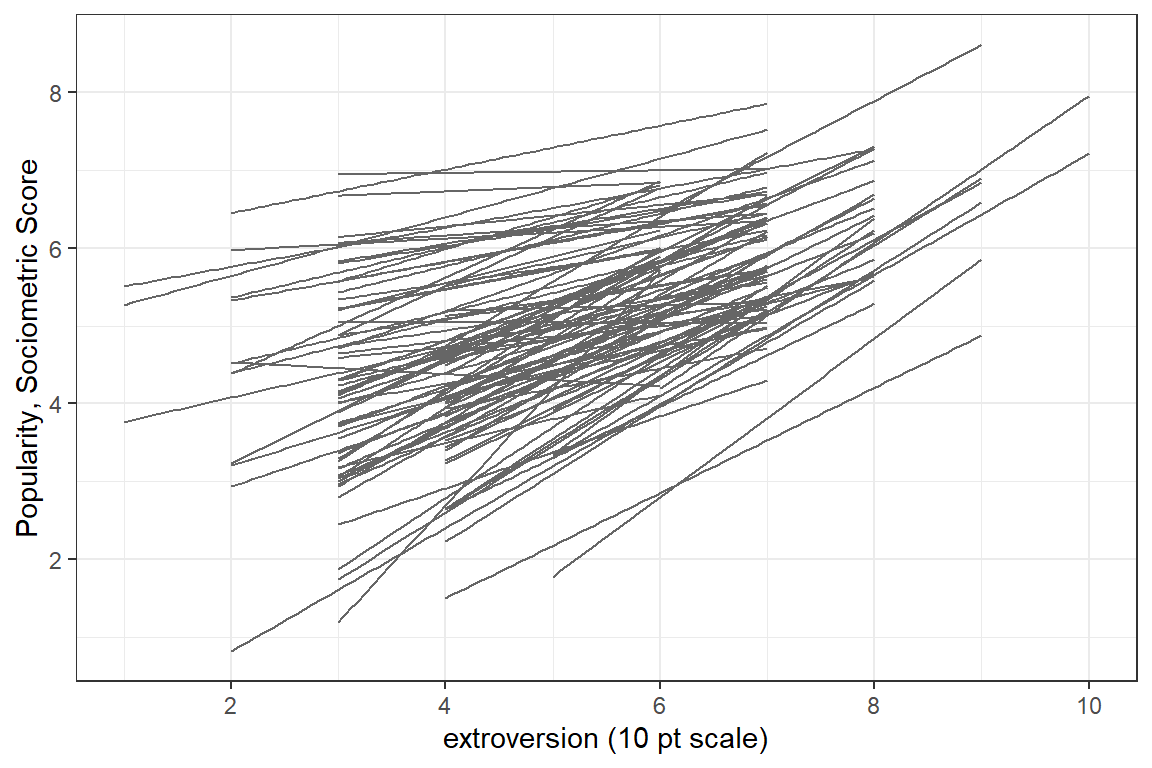
Figure 5.6
Peer-Rated Popularity Regressed on Extroversion Independently for each of the 100 Classes
A helpful resource for choosing colors to use in plots: R color cheatsheet
Spaghetti plot of seperate, independent linear models for each of the 100 classes. Seperate panels are used to untangle the ‘hairball’ in the previous figure. The columns are seperated by the pupils’ gender and the rows by the teacher’s experince in years.
# compare all 100 classrooms via independent linear models
df_pop %>%
  dplyr::mutate(texp3 = cut(texp,
                            breaks = c(0, 10, 18, 30)) %>%
                  factor(labels = c("< 10 yrs",
                                    "10 - 18 yrs",
                                    "> 18 yrs"))) %>%
  ggplot(aes(x     = extrav,                     # x-axis values
             y     = popular,                    # y-axis values
             group = class)) +                   # GROUPs for LINES
  geom_smooth(aes(color = sex),
              size   = 0.3,
              method = "lm",                     # linear regression line
              se     = FALSE) +
  theme_bw() +                                   # white background
  labs(x    = "extroversion (10 pt scale)",      # x-axis label
       y    = "Popularity, Sociometric Score") + # y-axis label
  guides(color = FALSE) +                        # don't include a legend
  scale_x_continuous(breaks = seq(from = 0, to = 10, by = 3)) + # x-ticks
  scale_y_continuous(breaks = seq(from = 0, to = 10, by = 3)) + # y-ticks
  scale_color_manual(values = c("dodgerblue", "maroon1")) +
facet_grid(texp3 ~ sex) 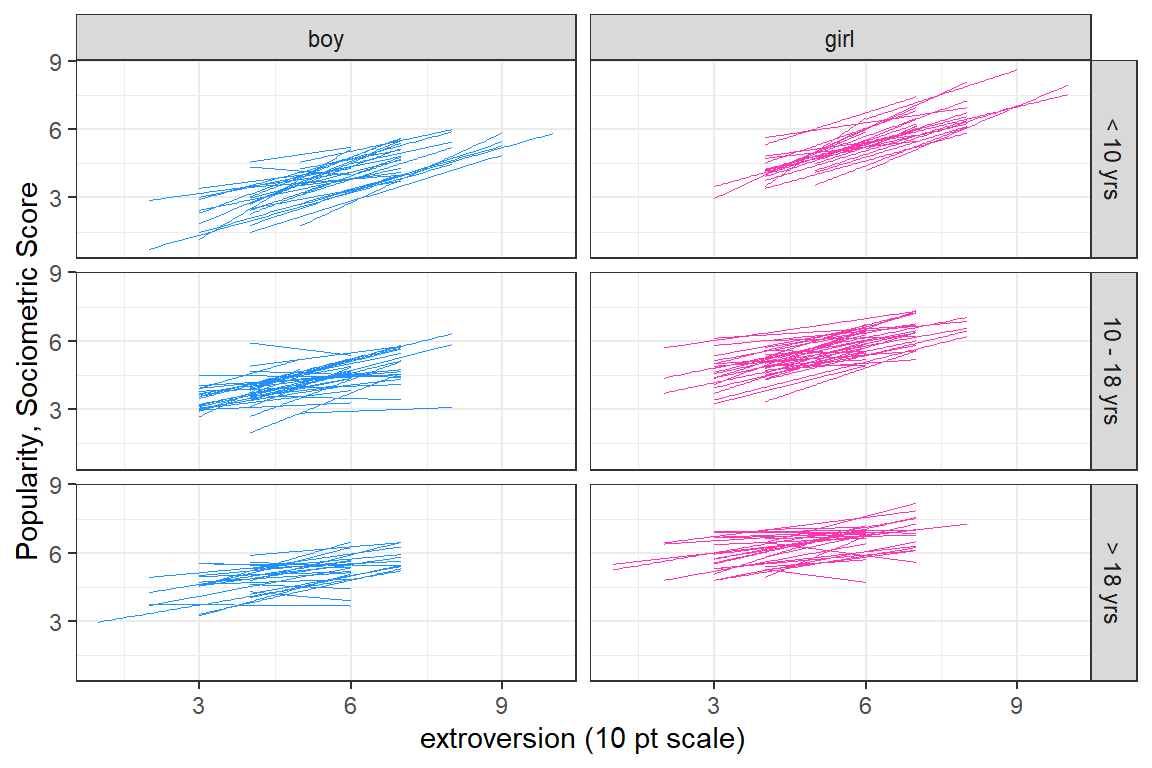
Figure 5.7
Peer-Rated Popularity Regressed on Extroversion Independently for each of the 100 Classes, Subset by Pupil Sex and Teacher’s Experience
5.3 Single-level Regression Analysis
5.3.1 Null Model
In a Null, intercept-only, or Empty model, no predictors are included.
5.3.1.1 Equations
Single-Level Regression Equation - Null Model \[ \overbrace{POP_{ij}}^{Outcome} = \underbrace{\beta_{0}}_{\text{Fixed}\atop\text{intercept}} + \underbrace{e_{ij}}_{\text{Random}\atop\text{residuals}} \]
5.3.1.2 Parameters
| Type | Parameter of Interest | Estimates This |
|---|---|---|
| Fixed | Intercept | \(\beta_{0}\) |
| Random | Residual Variance \(var[e_{ij}]\) | \(\sigma^2_{e}\) |
5.3.1.3 Fit the Model
Call:
lm(formula = popular ~ 1, data = df_pop)

Residuals:
    Min      1Q  Median      3Q     Max
-5.0765 -0.9765  0.0235  0.9236  4.4235

Coefficients:
            Estimate Std. Error t value Pr(>|t|)
(Intercept)  5.07645    0.03091   164.2   <2e-16 ***
---
Signif. codes:  0 '***' 0.001 '**' 0.01 '*' 0.05 '.' 0.1 ' ' 1

Residual standard error: 1.383 on 1999 degrees of freedom
\(\hat{\beta_0}\) = 5.08 is the grand mean
Call:
glm(formula = popular ~ 1, data = df_pop)

Coefficients:
            Estimate Std. Error t value Pr(>|t|)
(Intercept)  5.07645    0.03091   164.2   <2e-16 ***
---
Signif. codes:  0 '***' 0.001 '**' 0.01 '*' 0.05 '.' 0.1 ' ' 1

(Dispersion parameter for gaussian family taken to be 1.911366)

    Null deviance: 3820.8  on 1999  degrees of freedom
Residual deviance: 3820.8  on 1999  degrees of freedom
AIC: 6974.4

Number of Fisher Scoring iterations: 2
5.3.1.4 Model Fit
# Indices of model performance

AIC    |   AICc |    BIC | R2 | R2 (adj.) |  RMSE | Sigma
---------------------------------------------------------
6974.4 | 6974.4 | 6985.6 | 0 | 0 | 1.382 | 1.383# Indices of model performance
AIC | AICc | BIC | R2 | RMSE | Sigma
---------------------------------------------
6974.4 | 6974.4 | 6985.6 | 0 | 1.382 | 1.383# Comparison of Model Performance Indices
Name | Model | AIC (weights) | AICc (weights) | BIC (weights) | R2
-------------------------------------------------------------------------
pop_lm_0 | lm | 6974.4 (0.500) | 6974.4 (0.500) | 6985.6 (0.500) | 0
pop_glm_0 | glm | 6974.4 (0.500) | 6974.4 (0.500) | 6985.6 (0.500) | 0
Name | RMSE | Sigma | R2 (adj.)
-------------------------------------
pop_lm_0 | 1.382 | 1.383 | 0
pop_glm_0 | 1.382 | 1.383 | Residual variance:
[1] 1.382522[1] 1.911366\(\hat{\sigma_e^2}\) = 1.9114 is residual variance (RMSE is sigma = 1.3825)
Variance Explained:
[1] 0\(R^2\) = 0 is the proportion of variance in popularity that is explained by the grand mean alone.
Deviance:
'log Lik.' 6970.39 (df=2)5.3.1.5 Interpretation
The grand average popularity of all pupils in all the classes is 5.08, and there is strong evidence that it is statistically significantly different than zero, p < .001. The mean alone accounts for none of the variance in popularity. The residual variance is the same as the total variance in popularity, var = 1.91.
Just to make sure…
[1] 5.07645[1] 1.9113665.3.2 Add Predictors to the Model
5.3.2.1 Equations
LEVEL 1: Student-specific predictors:
- \(X_1 = GEN\), pupils’s gender (girl vs. boy)
- \(X_2 = EXT\), pupil’s extroversion (scale: 1-10)
Single-Level Regression Equation \[ \overbrace{POP_{ij}}^{Outcome} = \underbrace{\beta_{0}}_{\text{Fixed}\atop\text{intercept}} + \underbrace{\beta_{1}}_{\text{Fixed}\atop\text{slope}} \overbrace{GEN_{ij}}^{\text{Predictor 1}} + \underbrace{\beta_{2}}_{\text{Fixed}\atop\text{slope}} \overbrace{EXT_{ij}}^{\text{Predictor 2}} + \underbrace{e_{ij}}_{\text{Random}\atop\text{residuals}} \tag{Hox 2.1} \]
5.3.2.2 Parameters
| Type | Parameter of Interest | Estimates This |
|---|---|---|
| Fixed | Intercept | \(\beta_{0}\) |
| Fixed | Slope or effect of sex |
\(\beta_{1}\) |
| Fixed | Slope or effect of extrav |
\(\beta_{2}\) |
| Random | Residual Variance \(var[e_{ij}]\) | \(\sigma^2_{e}\) |
5.3.2.3 Fit the Model
Call:
lm(formula = popular ~ sex + extrav, data = df_pop)

Residuals:
    Min      1Q  Median      3Q     Max
-4.2527 -0.6652 -0.0454  0.7422  3.0473

Coefficients:
            Estimate Std. Error t value Pr(>|t|)
(Intercept)  2.78954    0.10355   26.94   <2e-16 ***
sexGirl      1.50508    0.04836   31.12   <2e-16 ***
extrav       0.29263    0.01916   15.28   <2e-16 ***
---
Signif. codes:  0 '***' 0.001 '**' 0.01 '*' 0.05 '.' 0.1 ' ' 1

Residual standard error: 1.077 on 1997 degrees of freedom
Multiple R-squared:  0.3938,    Adjusted R-squared:  0.3932
F-statistic: 648.6 on 2 and 1997 DF,  p-value: < 2.2e-16
pop_glm_1 <- glm(popular ~ sex + extrav, # implies: 1 + sex + extrav
data = df_pop)
summary(pop_glm_1)
Call:
glm(formula = popular ~ sex + extrav, data = df_pop)

Coefficients:
            Estimate Std. Error t value Pr(>|t|)
(Intercept)  2.78954    0.10355   26.94   <2e-16 ***
sexGirl      1.50508    0.04836   31.12   <2e-16 ***
extrav       0.29263    0.01916   15.28   <2e-16 ***
---
Signif. codes:  0 '***' 0.001 '**' 0.01 '*' 0.05 '.' 0.1 ' ' 1

(Dispersion parameter for gaussian family taken to be 1.159898)

    Null deviance: 3820.8  on 1999  degrees of freedom
Residual deviance: 2316.3  on 1997  degrees of freedom
AIC: 5977.4

Number of Fisher Scoring iterations: 2
\(\hat{\beta_0}\) = 2.79 is the extrapolated mean for boys with an extroversion score of 0.
\(\hat{\beta_1}\) = 1.51 is the mean difference between girls and boys with the same extroversion score.
\(\hat{\beta_2}\) = 0.29 is the mean difference for pupils of the same gender that differ in extroversion by one point.
5.3.2.4 Model Fit
Residual variance:
[1] 1.076985[1] 1.159898\(\hat{\sigma_e^2}\) = 1.1599 is residual variance (RMSE is sigma)
Variance Explained:
[1] 0.393765Deviance:
'log Lik.' 5969.415 (df=4)\(R^2\) = 0.394 is the proportion of variance in popularity that is explained by tha pupils gender and extroversion score.
# Indices of model performance

AIC    |   AICc |    BIC |    R2 | R2 (adj.) |  RMSE | Sigma
------------------------------------------------------------
5977.4 | 5977.4 | 5999.8 | 0.394 |     0.393 | 1.076 | 1.077
Note”:
BF= the Bayes factor
# Comparison of Model Performance Indices

Name     | Model |    R2 | R2 (adj.) |  RMSE | Sigma | AIC weights
------------------------------------------------------------------
pop_lm_1 |    lm | 0.394 |     0.393 | 1.076 | 1.077 |        1.00
pop_lm_0 |    lm | 0.000 |     0.000 | 1.382 | 1.383 |   3.23e-217

Name     | AICc weights | BIC weights | Performance-Score
---------------------------------------------------------
pop_lm_1 |         1.00 |        1.00 |           100.00%
pop_lm_0 | 3.26e-217 | 8.75e-215 | 0.00%# Comparison of Model Performance Indices
Name | Model | R2 | RMSE | Sigma | AIC weights | AICc weights
----------------------------------------------------------------------
pop_glm_1 | glm | 0.394 | 1.076 | 1.077 | 1.00 | 1.00
pop_glm_0 | glm | 0.000 | 1.382 | 1.383 | 3.23e-217 | 3.26e-217
Name | BIC weights | Performance-Score
-------------------------------------------
pop_glm_1 | 1.00 | 100.00%
pop_glm_0 | 8.75e-215 | 0.00%5.3.2.5 Interpretation
On average, girls were rated 1.51 points more popular than boys with the same extroversion score, p < .001. One point higher extroversion scores were associated with 0.29 points higher popularity, within each gender, p<.001. Together, these two factors account for 39.4% of the variance in populartiy.
5.3.3 Compare Fixed Effects
5.3.3.1 Compare Nested Models
Create a table to compare the two nested models:
apaSupp::tab_lms(list("Null Model"     = pop_lm_0,
                      "With Predictors" = pop_lm_1),
                 caption = "Single Level Models: ML with the `glm()` function")
| Null Model | With Predictors | ||||
|---|---|---|---|---|---|---|
Variable | b | (SE) | p | b | (SE) | p |
(Intercept) | 5.08 | (0.03) | < .001*** | 2.79 | (0.10) | < .001*** |
sex | ||||||
Boy | — | — | ||||
Girl | 1.51 | (0.05) | < .001*** | |||
extrav | 0.29 | (0.02) | < .001*** | |||
AIC | 6974.39 | 5977.42 | ||||
BIC | 6985.59 | 5999.82 | ||||
R² | .000 | .394 | ||||
Adjusted R² | .000 | .393 | ||||
Note. | ||||||
* p < .05. ** p < .01. *** p < .001. | ||||||
When comparing the fit of two single-level models fit via the
lm() function, the anova() function runs an
F-test where the test statistic is the difference in RSS.
Analysis of Variance Table

Model 1: popular ~ 1
Model 2: popular ~ sex + extrav
  Res.Df    RSS Df Sum of Sq      F    Pr(>F)
1   1999 3820.8
2   1997 2316.3  2    1504.5 648.55 < 2.2e-16 ***
---
Signif. codes:  0 '***' 0.001 '**' 0.01 '*' 0.05 '.' 0.1 ' ' 1
Obviously the model with predictors fits better than the model with no predictors.
5.3.3.2 Terminology
The following terminology applies to single-level models fit with ordinary least-squared estimation (the lm() function in \(R\)). Values are calculated below for the NULL model.
- Mean squared error (MSE) is the MEAN of the square of the residuals:
[1] 1.91041- Root mean squared error (RMSE) which is the SQUARE ROOT of MSE:
[1] 1.382176- Residual sum of squares (RSS) is the SUM of the squared residuals:
[1] 3820.821- Residual standard error (RSE) is the SQUARE ROOT of (RSS / degrees of freedom):
[1] 1.382522The same calculation, may be simplified with the previously calculated RSS:
[1] 1.382522When the ‘deviance()’ function is applied to a single-level model fit via ‘lm()’, the Residual sum of squares (RSS) is returned, not the deviance as defined as twice the negative log likelihood (-2LL).
[1] 3820.821'log Lik.' 6970.39 (df=2)5.4 Multi-level Regression Analysis
5.4.1 Intercept-only or Null Model
In a Null, intercept-only, or Empty model, no predictors are included.
“The intercept-only model is useful as a null-model that serves as a benchmark with which other models are compared.” Hox et al. (2017), page 13
5.4.1.1 Equations
Level 1 Model Equation:
\[ \overbrace{Y_{ij}}^{Outcome} = \underbrace{\beta_{0j}}_{\text{Level 2}\atop\text{intercepts}} + \underbrace{e_{ij}}_{\text{Random}\atop\text{residuals}} \tag{Hox 2.6} \]
Level 2 Model Equation:
\[ \overbrace{\beta_{0j}}^{\text{Level 2}\atop\text{intercepts}} = \underbrace{\gamma_{00}}_{\text{Fixed}\atop\text{intercept}} + \underbrace{u_{0j}}_{\text{Random}\atop\text{intercepts}} \tag{Hox 2.7} \]
Substitute equation (2.7) into equation (2.6):
Combined, Multilevel Model Equation - Null Model \[ \overbrace{Y_{ij}}^{Outcome} = \underbrace{\gamma_{00}}_{\text{Fixed}\atop\text{intercept}} + \underbrace{u_{0j}}_{\text{Random}\atop\text{intercepts}} + \underbrace{e_{ij}}_{\text{Random}\atop\text{residuals}} \tag{Hox 2.8} \]
5.4.1.2 Parameters
| Type | Parameter of Interest | Estimates This |
|---|---|---|
| Fixed | Intercept | \(\gamma_{00}\) |
| Random | Variance in random intercepts, \(var[u_{0j}]\) | \(\sigma^2_{u0}\) |
| Random | Residual Variance \(var[e_{ij}]\) | \(\sigma^2_{e}\) |
(Hox et al. 2017) labeled the Null model for this dataset “\(M_0\)” in chapter 2:
Combined, Multilevel Model Equation - Popularity, Random Intercepts Only! \[ \overbrace{POP_{ij}}^{Outcome} = \underbrace{\gamma_{00}}_{\text{Fixed}\atop\text{intercept}} + \underbrace{u_{0j}}_{\text{Random}\atop\text{intercepts}} + \underbrace{e_{ij}}_{\text{Random}\atop\text{residuals}} \tag{M0: intercept only} \]
5.4.1.3 Fit the Model
Fit the model to the data.
pop_lmer_0_re <- lmerTest::lmer(popular ~ 1 + (1|class),  # include a fixed and random intercept
                                data = df_pop,
                                REML = TRUE)             # fit via REML (the default) for ICC calculations

summary(pop_lmer_0_re)
Linear mixed model fit by REML. t-tests use Satterthwaite's method [
lmerModLmerTest]
Formula: popular ~ 1 + (1 | class)
Data: df_pop
REML criterion at convergence: 6330.5
Scaled residuals:
Min 1Q Median 3Q Max
-3.5655 -0.6975 0.0020 0.6758 3.3175
Random effects:
Groups Name Variance Std.Dev.
class (Intercept) 0.7021 0.8379
Residual 1.2218 1.1053
Number of obs: 2000, groups: class, 100
Fixed effects:
Estimate Std. Error df t value Pr(>|t|)
(Intercept) 5.07786 0.08739 98.90973 58.1 <2e-16 ***
---
Signif. codes: 0 '***' 0.001 '**' 0.01 '*' 0.05 '.' 0.1 ' ' 1Est | (SE) | p | |
|---|---|---|---|
(Intercept) | 5.08 | (0.09) | < .001*** |
class.var__(Intercept) | 0.70 | ||
Residual.var__Observation | 1.22 | ||
Note. Est = estimated regresssion coefficient for fixed effects and varaince/covariance estimates for random effects. p = significance from Wald t-test for parameter estimate using Satterthwaite's method for degrees of freedom. | |||
* p < .05. ** p < .01. *** p < .001. | |||
5.4.1.4 Interpretation
The grand average popularity of all students is 5.08 and the class averages tend to vary by 0.84 points above or below that.
Estimation Methods
Multilevel models may be fit by various methods. The most commonly used (and availabel in ‘lme4’) optimize various criterions: Maximum Likelihood (ML) -or- Restricted Maximum Likelihood (REML). Hox et al. (2017) discusses these and other methods in chapter 3. At the end of chapter 2, the authors’ second note staes that the details of estimation methods are glossed over in the current example in an effort to simplfy the introductory. Here we follow these guidelines:
-
Use ML for fitting:
-
nested models that differ only by inclusion/exclusion of FIXED effects, to test parameter significance via a likelihood ratio test
-
Use REML for fitting:
-
the NULL model, on which to base ICC calculations
-
nested models that differ only by inclusion/exclusion of RANDOM effects, to test parameter significance via a likelihood ratio test
-
the FINAL model
This often leads to refitting identical models via BOTH estimation methods.
5.4.2 Intraclass Correlation (ICC)
Although the Null model above does not explain any variance in the dependent variable (popularity), since there are no independent variables, it does decompose (i.e. divide up) the variance in the dependent variable into two pieces. We can compute the amount of total variance in popularity that is attribute to the clustering of students (i.e. class-to-class variance or between-class variance) in classes verses the residual variance (i.e. student-to-student variance or within-class variance).
Intraclass Correlation (ICC) Formula \[ \overbrace{\rho}^{\text{ICC}} = \frac{\overbrace{\sigma^2_{u0}}^{\text{Random Intercept}\atop\text{Variance}}} {\underbrace{\sigma^2_{u0}+\sigma^2_{e}}_{\text{Total}\atop\text{Variance}}} \tag{Hox 2.9} \]
The VarCorr() function in the lme4 package
returns the standard deviations, not the variances (\(var = SD^2\)) for a model fit via the
lme4::lmer() function. The summary() function
reports both the variances and the stadard deviations.
lme4::VarCorr(pop_lmer_0_re) %>%  # extract random compondent: varrainces and correlations
  print(comp = c("Variance", "Std.Dev"),
        digits = 3)
Groups Name Variance Std.Dev.
class (Intercept) 0.702 0.838
Residual 1.222 1.105 $var.fixed
[1] 0
$var.random
[1] 0.7021047
$var.residual
[1] 1.221793
$var.distribution
[1] 1.221793
$var.dispersion
[1] 0
$var.intercept
class
0.7021047 Again, this partitions the amount of total variance in popularity that is attribute to the clustering of students (i.e. class-to-class variance or between-class variance) in classes verses the residual variance (i.e. student-to-student variance or within-class variance).
\[ \begin{align*} \text{between classes} \rightarrow \; & \sigma^2_{u0} = 0.83792^2 = 0.702\\ \text{pupils within classes} \rightarrow \; & \sigma^2_{e} = 1.10535^2 = 1.222\\ \end{align*} \]
5.4.2.1 By Hand
Calculate the ICC by hand:
\[ \overbrace{\rho}^{\text{ICC}} = \frac{\overbrace{\sigma^2_{u0}}^{\text{Random Intercept}\atop\text{Variance}}} {\underbrace{\sigma^2_{u0}+\sigma^2_{e}}_{\text{Total}\atop\text{Variance}}} = \frac{0.702} {0.702+1.222} = \frac{0.702} {1.924} = 0.3648649 \]
[1] 0.36486495.4.2.2 The performance package
Calculate the ICC with the icc() function in the performance package:
# Intraclass Correlation Coefficient

    Adjusted ICC: 0.365
  Unadjusted ICC: 0.365
5.4.2.3 Interpretation
WOW! 36.5% of the variance of the popularity scores is at the group level, which is very high for social science data.
Over a third of the variance in peer popularity may be attributed to class to class differences, ICC = 0.365.
The ICC should be based on a Null (intercept only) model fit via REML (restricted maximum likelihood) estimation. This is the default for the ‘lme4::lmer()’ function. In chapter 2, Hox et al. (2017) presents the numbers based on fitting the model via ML (maximum likelihood) estimation and thus does not match the presentation above exactly (not just rounding error). This is because: (1) estimation methods (REML & ML) are not discussed until chapter 3 and (2) due to the Null model also being used for model fit comparisons in Table 2.1 on the top of page 14. Here we will fit the empty model twice, above by ML and below by REML
5.4.2.4 Percent of variance explained
The marginal \(R^2\) considers only the variance of the fixed effects, while the conditional \(R^2\) takes both the fixed and random effects into account. The random effect variances are actually the mean random effect variances, thus the \(R^2\) value is also appropriate for mixed models with random slopes or nested random effects (see Johnson 2014)*.
Johnson, P. C. D. (2014). Extension of Nakagawa & Schielzeth’s R2 GLMM to random slopes models. Methods in Ecology and Evolution, 5(9), 944–946. doi: 10.1111/2041-210X.12225
# R2 for Mixed Models

  Conditional R2: 0.365
Marginal R2: 0.000# Indices of model performance
AIC | AICc | BIC | R2 (cond.) | R2 (marg.) | ICC | RMSE | Sigma
--------------------------------------------------------------------------
6336.5 | 6336.5 | 6353.3 | 0.365 | 0 | 0.365 | 1.080 | 1.1055.4.3 Add Predictors to the Model
(Hox et al. 2017) labeled this as “\(M_1\)” in chapter 2 for their Table 2.1 (page 14), but adjusted it for Tables 2.2 (page 15) and 2.3 (page 17).
LEVEL 1: Student-specific predictors:
- \(X_1 = GEN\), pupils’s gender (girl vs. boy)
- \(X_2 = EXT\), pupil’s extroversion (scale: 1-10)
LEVEL 2: Class-specific Predictors:
- \(Z = YRS\), teacher’s experience (range of 2-25 years)
5.4.3.1 Equations
Level 1 Model Equation:
Include main effects for sex and extrav
\[ \overbrace{POP_{ij}}^{Outcome} = \underbrace{\beta_{0j}}_{\text{Level 2}\atop\text{intercept}} + \underbrace{\beta_{1j}}_{\text{Level 2}\atop\text{slopes}} \overbrace{GEN_{ij}}^{\text{Level 1}\atop\text{Predictor 1}} + \underbrace{\beta_{2j}}_{\text{Level 2}\atop\text{slopes}} \overbrace{EXT_{ij}}^{\text{Level 1}\atop\text{Predictor 2}} + \underbrace{e_{ij}}_{\text{Random}\atop\text{residuals}} \]
Level 2 Model Equations:
Include a random intercepts and random slopes for both for sex and extrav, but NO cross level interactions for now.
We will assume this is due to some theoretical reasoning to be our starting point after the fitting of the null model.
- Random Intercepts:
\[ \overbrace{\beta_{0j}}^{\text{Level 2}\atop\text{intercepts}} = \underbrace{\gamma_{00}}_{\text{Fixed}\atop\text{intercept}} + \underbrace{\gamma_{01}}_{\text{Fixed}\atop\text{slope } Z} \overbrace{YRS_{j}}^{\text{Level 2}\atop\text{Predictor 3}} + \underbrace{u_{0j}}_{\text{Intercept}\atop\text{residual}} \]
- Random Slopes, for the first predictor,
sex:
\[ \overbrace{\beta_{1j}}^{\text{Level 2}\atop\text{slopes}} = \underbrace{\gamma_{10}}_{\text{Fixed}\atop\text{Slope } X_1} + \underbrace{u_{1j}}_{\text{Slope } X_1\atop\text{residual}} \]
- Random Slopes, for the second predictor,
extrav:
\[ \overbrace{\beta_{2j}}^{\text{Level 2}\atop\text{slopes}} = \underbrace{\gamma_{20}}_{\text{Fixed}\atop\text{Slope } X_2} + \underbrace{u_{2j}}_{\text{Slope } X_2\atop\text{residual}} \]
Substitute the level 2 equations into the level 1 equation:
Combined, Multilevel Model Equation - Popularity, Include Predictors (no cross-level interactions) \[ \overbrace{POP_{ij}}^{Outcome} = \overbrace{\gamma_{00} + \gamma_{10} GEN_{ij} + \gamma_{20} EXT_{ij} + \gamma_{01} YRS_{j}}^{\text{Fixed part}\atop\text{Deterministic}} + \\ \underbrace{u_{0j} + u_{1j} GEN_{ij} + u_{2j} EXT_{ij} + e_{ij} }_{\text{Random part}\atop\text{Stochastic}} \tag{M1} \]
5.4.3.2 Parameters
| Type | Parameter of Interest | Estimates This |
|---|---|---|
| Fixed | Intercept | \(\gamma_{00}\) |
| Fixed | Main Effect of sex |
\(\gamma_{10}\) |
| Fixed | Main Effect of extrav |
\(\gamma_{20}\) |
| Fixed | Main Effect of texp |
\(\gamma_{01}\) |
| Random | Variance in random intercepts, \(var[u_{0j}]\) | \(\sigma^2_{u0}\) |
| Random | Variance in random slope of sex, \(var[u_{1j}]\) |
\(\sigma^2_{u1}\) |
| Random | Variance in random slope of extrav, \(var[u_{2j}]\) |
\(\sigma^2_{u2}\) |
| Random | Covariance between random intercepts and random slope of sex, \(cov[u_{0j}, u_{1j}]\) |
\(\sigma^2_{u01}\) |
| Random | Covariance between random intercepts and random slope of extrav, \(cov[u_{0j}, u_{2j}]\) |
\(\sigma^2_{u02}\) |
| Random | Covariance between random slopes of sex and extrav, \(cov[u_{1j}, u_{2j}]\) |
\(\sigma^2_{u12}\) |
| Random | Residual Variance \(var[e_{ij}]\) | \(\sigma^2_{e}\) |
Troubleshooting ‘lme4’ Linear Mixed-Effects Models website. This website attempts to summarize some of the common problems with fitting lmer models and how to troubleshoot them.
This is a helpful post on Stack Exchange regarding using differen t optimizers to get the ‘lme4::lmer()’ function to converge.
Note: Convergence issues MAY signify problems in the model specification.
5.4.3.3 Fit the Model
pop_lmer_0_ml <- lmerTest::lmer(popular ~ 1 + (1|class),
                                data   = df_pop,
                                REML   = FALSE)        # refit via ML to compare the model below to


pop_lmer_1_ml <- lmerTest::lmer(popular ~ sex + extrav + texp + (sex + extrav|class),
                                data   = df_pop,
                                REML   = FALSE,
                                control = lmerControl(optimizer = "Nelder_Mead")) #helps converge

summary(pop_lmer_1_ml)
Linear mixed model fit by maximum likelihood . t-tests use Satterthwaite's
method [lmerModLmerTest]
Formula: popular ~ sex + extrav + texp + (sex + extrav | class)
Data: df_pop
Control: lmerControl(optimizer = "Nelder_Mead")
AIC BIC logLik -2*log(L) df.resid
4833.3 4894.9 -2405.6 4811.3 1989
Scaled residuals:
Min 1Q Median 3Q Max
-3.1686 -0.6550 -0.0227 0.6728 2.9571
Random effects:
Groups Name Variance Std.Dev. Corr
class (Intercept) 1.319429 1.14866
sexGirl 0.002389 0.04888 -0.40
extrav 0.034115 0.18470 -0.88 -0.09
Residual 0.551144 0.74239
Number of obs: 2000, groups: class, 100
Fixed effects:
Estimate Std. Error df t value Pr(>|t|)
(Intercept) 7.601e-01 1.959e-01 1.839e+02 3.879 0.000146 ***
sexGirl 1.251e+00 3.692e-02 9.930e+02 33.884 < 2e-16 ***
extrav 4.529e-01 2.451e-02 9.715e+01 18.477 < 2e-16 ***
texp 8.942e-02 8.533e-03 1.034e+02 10.480 < 2e-16 ***
---
Signif. codes: 0 '***' 0.001 '**' 0.01 '*' 0.05 '.' 0.1 ' ' 1
Correlation of Fixed Effects:
(Intr) sexGrl extrav
sexGirl -0.063
extrav -0.720 -0.066
texp -0.683 -0.040 0.090
optimizer (Nelder_Mead) convergence code: 0 (OK)
boundary (singular) fit: see help('isSingular')5.4.3.4 Interpretation
After accounting for the hierarchical nesting of students in classes, girls were rated 1.25 points more popular on average, than boys with the same extroversion score. One point higher extroversion scores were associated with 0.45 points higher popularity, within each gender.
Reproduce Table 2.1 on the top of page 14 (Hox et al. 2017)
apaSupp::tab_lmers(list("M0: intercept only" = pop_lmer_0_ml,
                        "M1: w/predictors" = pop_lmer_1_ml),
                   var_labels = c("sex" = "Pupil Gender",
                                  "extrav" = "Pupil Extraversion",
                                  "texp" = "Teacher Experience"),
                   general_note = "Covariances included here but left off in the book.")
| M0: intercept only | M1: w/predictors | ||||
|---|---|---|---|---|---|---|
Variable | b | (SE) | p | b | (SE) | p |
(Intercept) | 5.08 | (0.09) | < .001*** | 0.76 | (0.20) | < .001*** |
Pupil Gender | ||||||
Boy | — | — | ||||
Girl | 1.25 | (0.04) | < .001*** | |||
Pupil Extraversion | 0.45 | (0.02) | < .001*** | |||
Teacher Experience | 0.09 | (0.01) | < .001*** | |||
class.var__(Intercept) | 0.69 | 1.32 | ||||
Residual.var__Observation | 1.22 | 0.55 | ||||
class.var__sexGirl | 0.00 | |||||
class.var__extrav | 0.03 | |||||
class.cov__(Intercept).sexGirl | -0.02 | |||||
class.cov__(Intercept).extrav | -0.19 | |||||
class.cov__sexGirl.extrav | 0.00 | |||||
AIC | 6,333 | 4,833 | ||||
BIC | 6,350 | 4,895 | ||||
Log-likelihood | -3,164 | -2,406 | ||||
Note. Covariances included here but left off in the book. | ||||||
* p < .05. ** p < .01. *** p < .001. | ||||||
“These covarianes are rarely interpreted (for an exception see Chapter 5 and Chapter 16 where growth models are discussed), and for that reason they are often not included in the reported tables. However, as Table 2.2 demonstrates, they can be quite large adn significant, so as a rule they are always included in the model.”
(Hox et al. 2017), Chapter 2, pages 15-16
Comparing Model Fit
- Residual Variance in the Residuals
-
In single-level regression, the Root Mean Squared Error (RMSE) is
usually reported. It is the standard deviation of the residuals and is
called “Residual standard error” in the R output of
summary()function applied to an model fit vialm. - In multi-level regression, residual variance is reported as \(\sigma_e^2\).
\[ {\text{RMSE}}^2 = MSE = \sigma_e^2 \]
- Deviance
-
In single-level regression, the model is fit in such a way as to make the sum of the squared residuals as small as possible. Deviance is the sum of the squared residuals.
-
In multi-level regression, the model is fit via a method called ‘Maximum Likelihood’.
\[ \text{Deviance} = -2LL = -2 \times log(likelihood) \]
5.4.4 Testing Random Components
In Hox’s table 2.1 (page 14) we see that the MLM with predictors (\(M_0\)) includes a random compondnt with virtually no variance. This is likely why the model didn’t easily converge (a different optimizer was employed). It makes sence to remove the random slope component for gender and refit the model. While we are at it, we will also fit a third model dropping the second random slope component for extroversion.
5.4.4.1 Fit Nested Models
Since we are going to compare models that are nested on random effects (identical except for inclusing/exclusing of random components, we will specify the REML = TRUE option.
pop_lmer_1_re <- lmerTest::lmer(popular ~ sex + extrav + texp + (sex + extrav|class),
                                data  = df_pop,
                                REML  = TRUE,
                                control = lmerControl(optimizer ="Nelder_Mead")) #helps converge

pop_lmer_1a_re <- lmerTest::lmer(popular ~ sex + extrav + texp + (extrav|class),
                                 data = df_pop,
                                 REML = TRUE)

pop_lmer_1b_re <- lmerTest::lmer(popular ~ sex + extrav + texp + (1 |class),
                                 data = df_pop,
                                 REML = TRUE)
Create a table to compare the three nested models:
The middle column below reproduces Hox’s Table 2.2 found on the bottom of page 15 (Hox et al. 2017), except the values differ slightly becuase here the model was fit via REML where as in the text, Hox used ML.
apaSupp::tab_lmers(list("M1\nAll"  = pop_lmer_1_re,
                        "M1a\nNon-zero" = pop_lmer_1a_re,
                        "M1b\nNone" = pop_lmer_1b_re),
                   narrow = TRUE,
                   caption = "Assessing Significance of Random Slopes",
                   general_note = "Models all include the same fixed effects, but differ by inclusing of random slopes.")
| M1 | M1a | M1b | |||
|---|---|---|---|---|---|---|
Variable | b | (SE) | b | (SE) | b | (SE) |
(Intercept) | 0.76 | (0.20) *** | 0.74 | (0.20) *** | 0.81 | (0.17) *** |
sex | ||||||
Boy | — | — | — | — | — | — |
Girl | 1.25 | (0.04) *** | 1.25 | (0.04) *** | 1.25 | (0.04) *** |
extrav | 0.45 | (0.02) *** | 0.45 | (0.02) *** | 0.45 | (0.02) *** |
texp | 0.09 | (0.01) *** | 0.09 | (0.01) *** | 0.09 | (0.01) *** |
class.var__(Intercept) | 1.34 | 1.30 | 0.30 | |||
class.var__sexGirl | 0.00 | |||||
class.var__extrav | 0.03 | 0.03 | ||||
class.cov__(Intercept).sexGirl | -0.02 | |||||
class.cov__(Intercept).extrav | -0.19 | -0.19 | ||||
class.cov__sexGirl.extrav | 0.00 | |||||
Residual.var__Observation | 0.55 | 0.55 | 0.59 | |||
AIC | 4,855 | 4,851 | 4,897 | |||
BIC | 4,917 | 4,896 | 4,931 | |||
Log-likelihood | -2,417 | -2,417 | -2,443 | |||
Note. Models all include the same fixed effects, but differ by inclusing of random slopes. | ||||||
* p < .05. ** p < .01. *** p < .001. | ||||||
apaSupp::tab_lmer_fits(list("M1: All"  = pop_lmer_1_re,
                            "M1a: Non-zero" = pop_lmer_1a_re,
                            "M1b: None" = pop_lmer_1b_re),
                       caption = "Compare Fit of Models Differing in Inclusion of Random Slopes",
                       general_note = "These models all include the same fixed effects, but differ by inclusing of random slopes.")
Random effect variances not available. Returned R2 does not account for random effects.Model | AIC | BIC | RMSE |
| |
|---|---|---|---|---|---|
Conditional | Marginal | ||||
M1: All | 4833.31 | 4894.92 | 0.71 | .625 | |
M1a: Non-zero | 4828.83 | 4873.64 | 0.71 | .696 | .511 |
M1b: None | 4874.31 | 4907.92 | 0.75 | .672 | .508 |
Note. Larger values indicated better performance. Smaller values indicated better performance for Akaike's Information Criteria (AIC), Bayesian information criteria (BIC), and Root Mean Squared Error (RMSE).These models all include the same fixed effects, but differ by inclusing of random slopes. | |||||
5.4.4.2 Compare Fit
Likelihood Ratio Test (LRT) of Nested MLM Models
When comparing the fit of two multi-level models fit via the
lmer() function, the anova() function runs an
Chi-squared test where the test statistic is the difference in -2LL
(deviances).
Likelihood Ratio Test (LRT) for Random Effects
When using the ‘anova()’ function to conduct a LRT for RANDOM effects, make sure:
- the nested models have identical FIXED effects
- never test models that differ in fixed and random effects at the same time
- the models were fit with ‘REML = TRUE’
- this results in the best variance/covariance component estimation
- add the ‘refit = FALSE’ option to the ‘anova()’ call
- without this \(R\) re-runs the models with ‘REML = FALSE’ for you
- Investigate dropping the random slope component for
sex
These two models are identical, except for the inclusing/exclusion of the random specification of the level 1 sex predictor. Note, both models were fit with REML. Although we are dropping only ONE variance component, we are also dropping TWO covariances (sex paired with both the random intercept and random slope for extrav). This results in a \(\chi^2\) test with THREE degrees of freedom.
Data: df_pop
Models:
pop_lmer_1a_re: popular ~ sex + extrav + texp + (extrav | class)
pop_lmer_1_re: popular ~ sex + extrav + texp + (sex + extrav | class)
               npar    AIC    BIC  logLik -2*log(L)  Chisq Df Pr(>Chisq)
pop_lmer_1a_re    8 4850.8 4895.6 -2417.4    4834.8
pop_lmer_1_re    11 4855.3 4916.9 -2416.6    4833.3 1.5133  3     0.6792
The NON-significance likelihood ratio test (LRT: \(\chi^2(3) = 1.51\), \(p = .679\)) conveys that the more complex model does NOT fit the data better. Thus the more SIMPLE model does just as good of a job. This is evidence for the EXCLUSION of sex as a random component.
- Investigate dropping the random slope component for
extrav
These two models are identical, except for the inclusing/exclusion of the random specification of the level 1 extrav predictor. Note, both models were fit with REML. Although we are dropping only ONE variance component, we are also dropping ONE covariances (extrav paired with the random intercept). This results in a \(\chi^2\) test with TWO degrees of freedom.
Data: df_pop
Models:
pop_lmer_1b_re: popular ~ sex + extrav + texp + (1 | class)
pop_lmer_1a_re: popular ~ sex + extrav + texp + (extrav | class)
               npar    AIC    BIC  logLik -2*log(L)  Chisq Df Pr(>Chisq)
pop_lmer_1b_re    6 4897.0 4930.6 -2442.5    4885.0
pop_lmer_1a_re    8 4850.8 4895.6 -2417.4    4834.8 50.256  2  1.222e-11 ***
---
Signif. codes:  0 '***' 0.001 '**' 0.01 '*' 0.05 '.' 0.1 ' ' 1
The significance likelihood ratio test (LRT: \(\chi^2(2) = 50.26\), \(p < .0001\)) conveys that the more complex model DOES fit the data better. Thus the more COMPLEX model does just as good of a job. This is evidence for the INCLUSION of extrav as a random component.
5.4.5 Testing Cross-Level Interactions
We have already seen formulas of this form for a NULL or emply models, as well as for intercept implied models of main effects:
intercept only
Y ~ 1intercept implied
Y ~ A=Y ~ 1 + AY ~ A + B=Y ~ 1 + A + B
Including Interactions in Formulas
If we wish to include an interaction between the two predictors, we signify this with a colon (:) between the two predictor names. A shortcut may also be employed to signify the including of the main effects and the interaction at the same time by placing an astric (*) between the two variable names. Both of the following specify the outcome is being predicted by an intercept (implied), the main effects for 2 predictors, and the interaction between the two predictors
-
Y ~ A + B + A:B -
Y ~ A*B
Examples
- 2-way:
A*B=A + B + A:B - 3-way:
A*B*C=A + B + C + A:B + A:C + B:C + A:B:C - 4-way:
A*B*C*D=A + B + C + D + A:B + A:C + A:D + B:C + B:D + A:B:C + A:B:D+ A:C:D + B:C:D + A:B:C:D
5.4.5.1 Fit Nested Models
“Given the significant variance of the regression coefficient of pupil extroversion across the classes, it is attractive to attempt to predict its variation using class-level variables. We have one class-level variable: teacher experience.”
(Hox et al. 2017), Chapter 2, page 16
Now that we wish to compare nested that will differ only in terms of the inclusing/exclusion of a FIXED effect, the estimation method should be standard maximum likelihood (REML = FALSE).
pop_lmer_1a_ml <- lmerTest::lmer(popular ~ sex + extrav + texp + (extrav|class), # main effects only
                                 data = df_pop,
                                 REML = FALSE)

pop_lmer_2_ml  <- lmerTest::lmer(popular ~ sex + extrav*texp + (extrav|class), # include cross-level interaction
                                 data = df_pop,
                                 REML = FALSE)

pop_lmer_3_ml  <- lmerTest::lmer(popular ~ extrav*texp + sex*texp + sex*extrav +  (extrav|class),
                                 data = df_pop,
                                 REML = FALSE)

pop_lmer_4_ml  <- lmerTest::lmer(popular ~ extrav*texp*sex + (extrav|class),
                                 data = df_pop,
                                 REML = FALSE,
                                 control = lmerControl(optimizer ="Nelder_Mead"))
Create a table to compare the two nested models:
apaSupp::tab_lmers(list("M1a\nMain Effects"    = pop_lmer_1a_ml,
                        "M2\nWith Interaction" = pop_lmer_2_ml),
                   caption = "Hox Table 2.3 on page 17",
                   general_note = "These models all include the same random effects, but differ by inclusion of fixed effects.")
| M1a | M2 | ||||
|---|---|---|---|---|---|---|
Variable | b | (SE) | p | b | (SE) | p |
(Intercept) | 0.74 | (0.20) | < .001*** | -1.21 | (0.27) | < .001*** |
sex | ||||||
Boy | — | — | — | — | ||
Girl | 1.25 | (0.04) | < .001*** | 1.24 | (0.04) | < .001*** |
extrav | 0.45 | (0.02) | < .001*** | 0.80 | (0.04) | < .001*** |
texp | 0.09 | (0.01) | < .001*** | 0.23 | (0.02) | < .001*** |
extrav * texp | -0.02 | (0.00) | < .001*** | |||
class.var__(Intercept) | 1.28 | 0.45 | ||||
class.var__extrav | 0.03 | 0.00 | ||||
class.cov__(Intercept).extrav | -0.18 | -0.03 | ||||
Residual.var__Observation | 0.55 | 0.55 | ||||
AIC | 4,829 | 4,766 | ||||
BIC | 4,874 | 4,816 | ||||
Log-likelihood | -2,406 | -2,374 | ||||
Note. These models all include the same random effects, but differ by inclusion of fixed effects. | ||||||
* p < .05. ** p < .01. *** p < .001. | ||||||
Investigate further interactions, not shown in by (Hox et al. 2017).
apaSupp::tab_lmers(list("M1a: Main Effects"     = pop_lmer_1a_ml,
                        "M2: With Interaction"  = pop_lmer_2_ml,
                        "Add 2-way Inter"       = pop_lmer_3_ml,
                        "Add 3-way Interaction" = pop_lmer_4_ml),
                   narrow = TRUE,
                   caption = "Hox Table 2.3 on page 17")
| M1a: Main Effects | M2: With Interaction | Add 2-way Inter | Add 3-way Interaction | ||||
|---|---|---|---|---|---|---|---|---|
Variable | b | (SE) | b | (SE) | b | (SE) | b | (SE) |
(Intercept) | 0.74 | (0.20) *** | -1.21 | (0.27) *** | -1.09 | (0.28) *** | -0.94 | (0.33) ** |
sex | ||||||||
Boy | — | — | — | — | — | — | — | — |
Girl | 1.25 | (0.04) *** | 1.24 | (0.04) *** | 0.96 | (0.21) *** | 0.66 | (0.38) |
extrav | 0.45 | (0.02) *** | 0.80 | (0.04) *** | 0.78 | (0.04) *** | 0.75 | (0.05) *** |
texp | 0.09 | (0.01) *** | 0.23 | (0.02) *** | 0.23 | (0.02) *** | 0.22 | (0.02) *** |
extrav * texp | -0.02 | (0.00) *** | -0.02 | (0.00) *** | -0.02 | (0.00) *** | ||
texp * sex | ||||||||
texp * Girl | 0.00 | (0.01) | 0.02 | (0.02) | ||||
extrav * sex | ||||||||
extrav * Girl | 0.05 | (0.03) | 0.10 | (0.06) | ||||
extrav * texp * sex | ||||||||
extrav * texp * Girl | 0.00 | (0.00) | ||||||
class.var__(Intercept) | 1.28 | 0.45 | 0.49 | 0.49 | ||||
class.var__extrav | 0.03 | 0.00 | 0.01 | 0.01 | ||||
class.cov__(Intercept).extrav | -0.18 | -0.03 | -0.03 | -0.03 | ||||
Residual.var__Observation | 0.55 | 0.55 | 0.55 | 0.55 | ||||
AIC | 4,829 | 4,766 | 4,767 | 4,768 | ||||
BIC | 4,874 | 4,816 | 4,829 | 4,835 | ||||
Log-likelihood | -2,406 | -2,374 | -2,373 | -2,372 | ||||
Note. | ||||||||
* p < .05. ** p < .01. *** p < .001. | ||||||||
5.4.5.2 Compare Fit
Since these two models only differ by the including/exclusing of a FIXED effect, they both employed ML estimation. Thus we do not need worry about the anova() function refitting the models prior to conduction the LRT.
Data: df_pop
Models:
pop_lmer_1a_ml: popular ~ sex + extrav + texp + (extrav | class)
pop_lmer_2_ml: popular ~ sex + extrav * texp + (extrav | class)
               npar    AIC    BIC  logLik -2*log(L)  Chisq Df Pr(>Chisq)
pop_lmer_1a_ml    8 4828.8 4873.6 -2406.4    4812.8
pop_lmer_2_ml     9 4765.6 4816.0 -2373.8    4747.6 65.183  1  6.827e-16 ***
---
Signif. codes:  0 '***' 0.001 '**' 0.01 '*' 0.05 '.' 0.1 ' ' 1
The significance likelihood ratio test (LRT: \(\chi^2(1) = 65.18\), \(p < .0001\)) conveys that the more complex model DOES fit the data better. Thus the more COMPLEX model does just as good of a job. This is evidence for the INCLUSION of cross-level interaction between extrav and texp as a fixed component.
Data: df_pop
Models:
pop_lmer_2_ml: popular ~ sex + extrav * texp + (extrav | class)
pop_lmer_3_ml: popular ~ extrav * texp + sex * texp + sex * extrav + (extrav | class)
              npar    AIC    BIC  logLik -2*log(L)  Chisq Df Pr(>Chisq)
pop_lmer_2_ml    9 4765.6 4816.0 -2373.8    4747.6
pop_lmer_3_ml   11 4767.2 4828.8 -2372.6    4745.2 2.4552  2      0.293
The significance likelihood ratio test (LRT: \(\chi^2(2) = 2.46\), \(p=.293\)) conveys that the more complex model does NOT fit the data better. Thus the more SIMPLE model does just as good of a job. This is evidence for the EXCLUSION of the additional 2-way interactions as a fixed components.
Data: df_pop
Models:
pop_lmer_2_ml: popular ~ sex + extrav * texp + (extrav | class)
pop_lmer_4_ml: popular ~ extrav * texp * sex + (extrav | class)
              npar    AIC    BIC  logLik -2*log(L)  Chisq Df Pr(>Chisq)
pop_lmer_2_ml    9 4765.6 4816.0 -2373.8    4747.6
pop_lmer_4_ml   12 4768.3 4835.5 -2372.1    4744.3 3.3636  3     0.3389
The significance likelihood ratio test (LRT: \(\chi^2(3) = 3.36\), \(p=.339\)) conveys that the more complex model does NOT fit the data better. Thus the more SIMPLE model does just as good of a job. This is evidence for the EXCLUSION of the additional 3-way interactions as a fixed components.
Model | AIC | BIC | RMSE |
| |
|---|---|---|---|---|---|
Conditional | Marginal | ||||
Model 1 | 4828.81 | 4873.61 | 0.72 | .695 | .513 |
Model 2 | 4765.62 | 4816.03 | 0.72 | .706 | .554 |
Model 3 | 4767.17 | 4828.78 | 0.72 | .708 | .555 |
Model 4 | 4768.26 | 4835.47 | 0.72 | .708 | .556 |
Note. Larger values indicated better performance. Smaller values indicated better performance for Akaike's Information Criteria (AIC), Bayesian information criteria (BIC), and Root Mean Squared Error (RMSE). | |||||
5.4.6 Final Model
5.4.6.2 Parameter Summary Table
Est | (SE) | p | |
|---|---|---|---|
(Intercept) | -1.21 | (0.27) | < .001*** |
sex | |||
Boy | — | — | |
Girl | 1.24 | (0.04) | < .001*** |
extrav | 0.80 | (0.04) | < .001*** |
texp | 0.23 | (0.02) | < .001*** |
extrav * texp | -0.02 | (0.00) | < .001*** |
class.var__(Intercept) | 0.48 | ||
class.var__extrav | 0.01 | ||
class.cov__(Intercept).extrav | -0.03 | ||
Residual.var__Observation | 0.55 | ||
Note. Est = estimated regresssion coefficient for fixed effects and varaince/covariance estimates for random effects. p = significance from Wald t-test for parameter estimate using Satterthwaite's method for degrees of freedom. | |||
* p < .05. ** p < .01. *** p < .001. | |||
apaSupp::tab_lmer(pop_lmer_2_re,
                  var_labels = c(sex = "Pupil Gender: Girl vs Boy",
                                 extrav = "Pupil Extraversion",
                                 texp = "Teacher Experience, yrs",
                                 "extrav * texp" = "Interaction: Extrav X Exp",
                                 "class.var__(Intercept)" = "Var: Random intercepts (Class Means)",
                                 "class.cov__(Intercept).extrav" = "Covar: Class Means X Extrav",
                                 "class.var__extrav" = "Var: Random Slopes (Class Exrav)",
                                 "Residual.var__Observation" = "Var: Residual"),
                  show_single_row = "sex",
                  p_note = "apa3",
caption = "Parameter Estimates for Final MLM")Est | (SE) | p | |
|---|---|---|---|
(Intercept) | -1.21 | (0.27) | < .001*** |
Pupil Gender: Girl vs Boy | 1.24 | (0.04) | < .001*** |
Pupil Extraversion | 0.80 | (0.04) | < .001*** |
Teacher Experience, yrs | 0.23 | (0.02) | < .001*** |
Interaction: Extrav X Exp | -0.02 | (0.00) | < .001*** |
Var: Random intercepts (Class Means) | 0.48 | ||
Var: Random Slopes (Class Exrav) | 0.01 | ||
Covar: Class Means X Extrav | -0.03 | ||
Var: Residual | 0.55 | ||
Note. Est = estimated regresssion coefficient for fixed effects and varaince/covariance estimates for random effects. p = significance from Wald t-test for parameter estimate using Satterthwaite's method for degrees of freedom. | |||
*** p < .001. | |||
5.4.7 Visualization
5.4.7.1 interactions package
Predictors: involved in the interaction … * extrav 1 value per student, continuous, score with range 1-10
* texp 1 value per class, continuous, years with range 2-25
Fastest way: all defaults
interactions::interact_plot(model = pop_lmer_2_re,    # model name
                            pred = extrav,    # x-axis 'predictor' independent variable name
                            modx = texp,      # 'moderator' (x) independent variable name
                            mod2 = sex)       # 2nd moderator independent variable name (optional)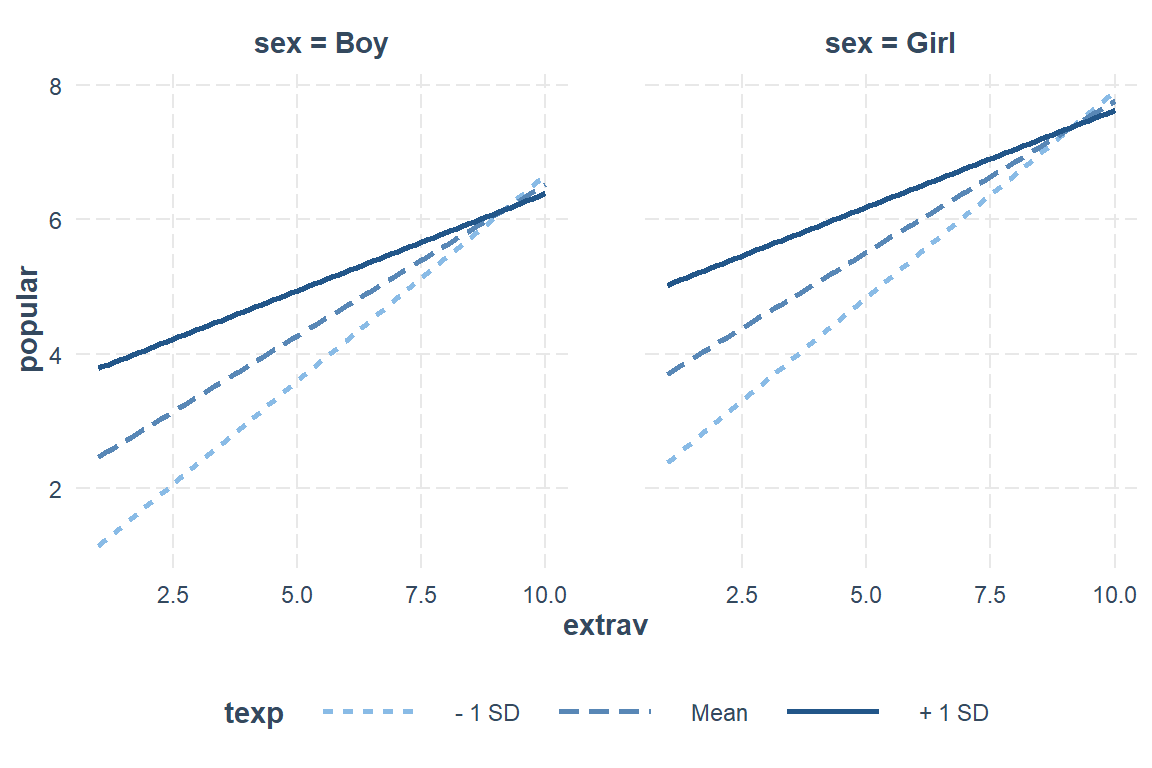
Simple Slopes
JOHNSON-NEYMAN INTERVAL

When texp is OUTSIDE the interval [29.16, 37.41], the slope of extrav is p
< .05.

Note: The range of observed values of texp is [2.00, 25.00]

SIMPLE SLOPES ANALYSIS

Slope of extrav when texp =  7.711184 (- 1 SD):

  Est.   S.E.   t val.      p
------ ------ -------- ------
  0.61   0.02    25.59   0.00

Slope of extrav when texp = 14.263000 (Mean):

  Est.   S.E.   t val.      p
------ ------ -------- ------
  0.45   0.02    25.89   0.00

Slope of extrav when texp = 20.814816 (+ 1 SD):

  Est.   S.E.   t val.      p
------ ------ -------- ------
  0.29   0.02    11.86   0.00
For student’s who’s teach has average experience (M = 14.25 years), a 1 unit increase in extraversion is associated with a nearly half point increase in popularity, b = 0.45, SE = 0.02, p < .01. When the teacher has more experience, this association is less distinct and when teachers have more experience, this relationship is more pronounced.
Girls have higher popularities after controlling for their level of extroversion and their teacher’s experience, b = 1.24, SE = 0.04, p < .001.
interactions::sim_slopes(model = pop_lmer_2_re,
                         pred = extrav,
                         modx = texp,
                         modx.values = c(5, 10, 20))
JOHNSON-NEYMAN INTERVAL
When texp is OUTSIDE the interval [29.16, 37.41], the slope of extrav is p
< .05.
Note: The range of observed values of texp is [2.00, 25.00]
SIMPLE SLOPES ANALYSIS
Slope of extrav when texp = 5.00:
Est. S.E. t val. p
------ ------ -------- ------
0.68 0.03 23.33 0.00
Slope of extrav when texp = 10.00:
Est. S.E. t val. p
------ ------ -------- ------
0.56 0.02 27.29 0.00
Slope of extrav when texp = 20.00:
Est. S.E. t val. p
------ ------ -------- ------
0.31 0.02 13.46 0.00For publications, you can get fancier
interactions::interact_plot(pop_lmer_2_re,                # model name
                            pred = extrav,                # x-axis 'predictor' variable name
                            modx = texp,                  # 'moderator' variable name
                            modx.values = c(5, 15, 25),   # values to pick for a continuous "modx"
                            interval = TRUE,              # adds CI bands for pop/marginal mean
                            y.label = "Estimated Marginal Mean\nPupil Popularity, Mean Rating of Classroom Peers",
                            x.label = "Pupil's Extroversion, as Rated by Teacher",
                            legend.main = "Teacher's Experience",
                            modx.labels = c("5 years",
                                            "15 years",
                                            "25 years"),
                            colors = c("black", "black", "black")) +   # default is "Blues" for modx.values
  theme_bw() +
  theme(legend.key.width = unit(2, "cm"),
        legend.background = element_rect(color = "Black"),
        legend.position = c(1, 0),
        legend.justification = c(1.1, -0.1)) +
  scale_x_continuous(breaks = seq(from = 0, to = 10, by = 2)) +
scale_y_continuous(breaks = seq(from = 0, to = 10, by = 1)) 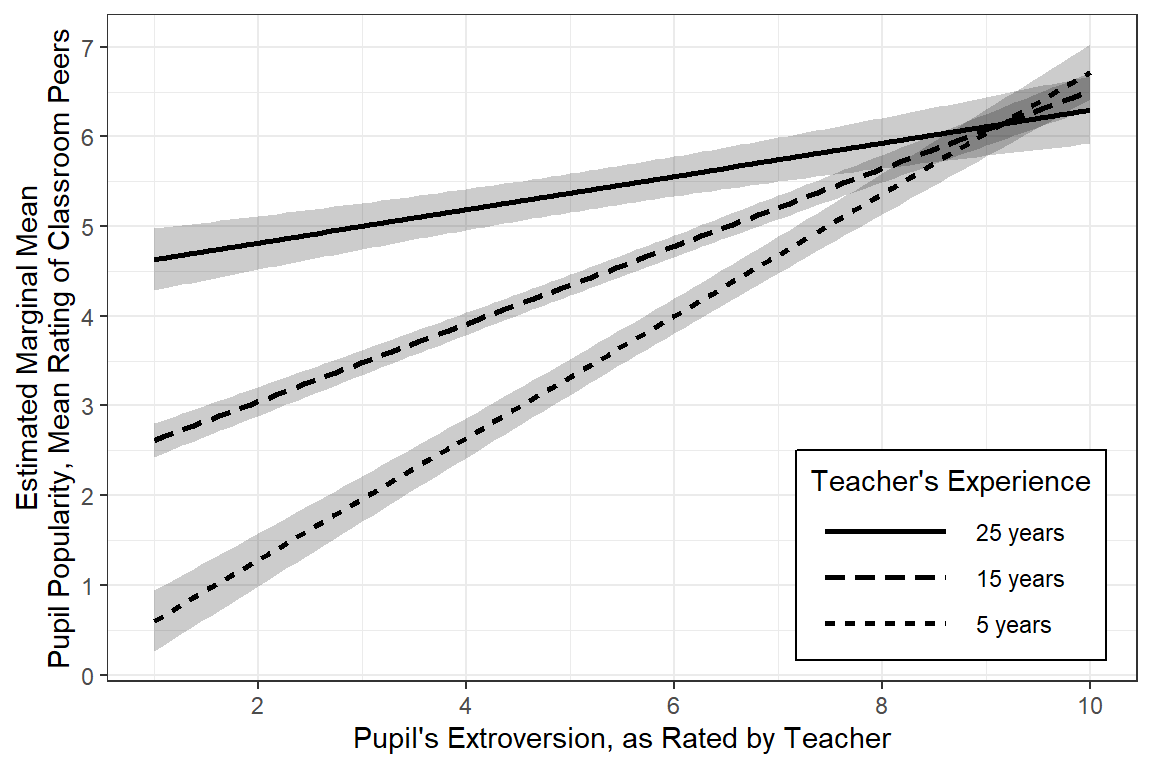
5.4.7.2 effects & ggplot2 packages
Get Estimated Marginal Means - default ‘nice’ predictor values:
Focal predictors: All combinations of… * sex categorical, both levels
* extrav continuous 1-10, default: 1, 3, 6, 8, 10
* texp continuous, default: 2.0, 7.8, 14.0, 19.0, 25.0
Always followed by: * fit estimated marginal mean * se standard error for the marginal mean * lower lower end of the 95% confidence interval around the estimated marginal mean * upper upper end of the 95% confidence interval around the estimated marginal mean
effects::Effect(focal.predictors = c("sex", "extrav", "texp"),
                mod = pop_lmer_2_re) %>%
  data.frame() %>%
  head(n = 12)
sex extrav texp fit se lower upper
1 Boy 1 2.0 -0.00309304 0.2113486 -0.4175801 0.411394
2 Girl 1 2.0 1.23760458 0.2138348 0.8182417 1.656967
3 Boy 3 2.0 1.50515155 0.1580364 1.1952179 1.815085
4 Girl 3 2.0 2.74584917 0.1602463 2.4315815 3.060117
5 Boy 6 2.0 3.76751843 0.1201262 3.5319324 4.003104
6 Girl 6 2.0 5.00821605 0.1208433 4.7712237 5.245208
7 Boy 8 2.0 5.27576302 0.1416431 4.9979792 5.553547
8 Girl 8 2.0 6.51646064 0.1410030 6.2399322 6.792989
9 Boy 10 2.0 6.78400761 0.1892756 6.4128090 7.155206
10 Girl 10 2.0 8.02470523 0.1878580 7.6562868 8.393124
11 Boy 1 7.8 1.16542895 0.1405371 0.8898140 1.441044
12 Girl 1 7.8 2.40612657 0.1432221 2.1252460 2.687007Pick ‘nicer’ illustrative values for texp
effects::Effect(focal.predictors = c("sex", "extrav", "texp"),
                mod = pop_lmer_2_re,
                xlevels = list(texp = c(5, 15, 25))) %>%
  data.frame() %>%
  head(n = 12)
sex extrav texp fit se lower upper
1 Boy 1 5 0.6013149 0.17312220 0.2617956 0.9408341
2 Girl 1 5 1.8420125 0.17571483 1.4974087 2.1866163
3 Boy 3 5 1.9611907 0.12951144 1.7071988 2.2151826
4 Girl 3 5 3.2018883 0.13176041 2.9434859 3.4602908
5 Boy 6 5 4.0010044 0.09857020 3.8076931 4.1943158
6 Girl 6 5 5.2417021 0.09913857 5.0472761 5.4361281
7 Boy 8 5 5.3608803 0.11620954 5.1329755 5.5887850
8 Girl 8 5 6.6015779 0.11532656 6.3754048 6.8277510
9 Boy 10 5 6.7207561 0.15520274 6.4163796 7.0251325
10 Girl 10 5 7.9614537 0.15351429 7.6603886 8.2625189
11 Boy 1 15 2.6160080 0.09471492 2.4302574 2.8017585
12 Girl 1 15 3.8567056 0.09677976 3.6669056 4.0465056Basic, default plot
Other than selecting three illustrative values for the teacher extroversion rating, most everything is left to default.
effects::Effect(focal.predictors = c("sex", "extrav", "texp"),
                mod = pop_lmer_2_re,
                xlevels = list(texp = c(5, 15, 25))) %>%
  data.frame() %>%
  dplyr::mutate(texp = factor(texp)) %>%
  ggplot() +
  aes(x = extrav,
      y = fit,
      fill = texp,
      linetype = texp) +
  geom_ribbon(aes(ymin = lower,
                  ymax = upper),
              alpha = .3) +
  geom_line(aes(color = texp)) +
facet_grid(.~ sex) 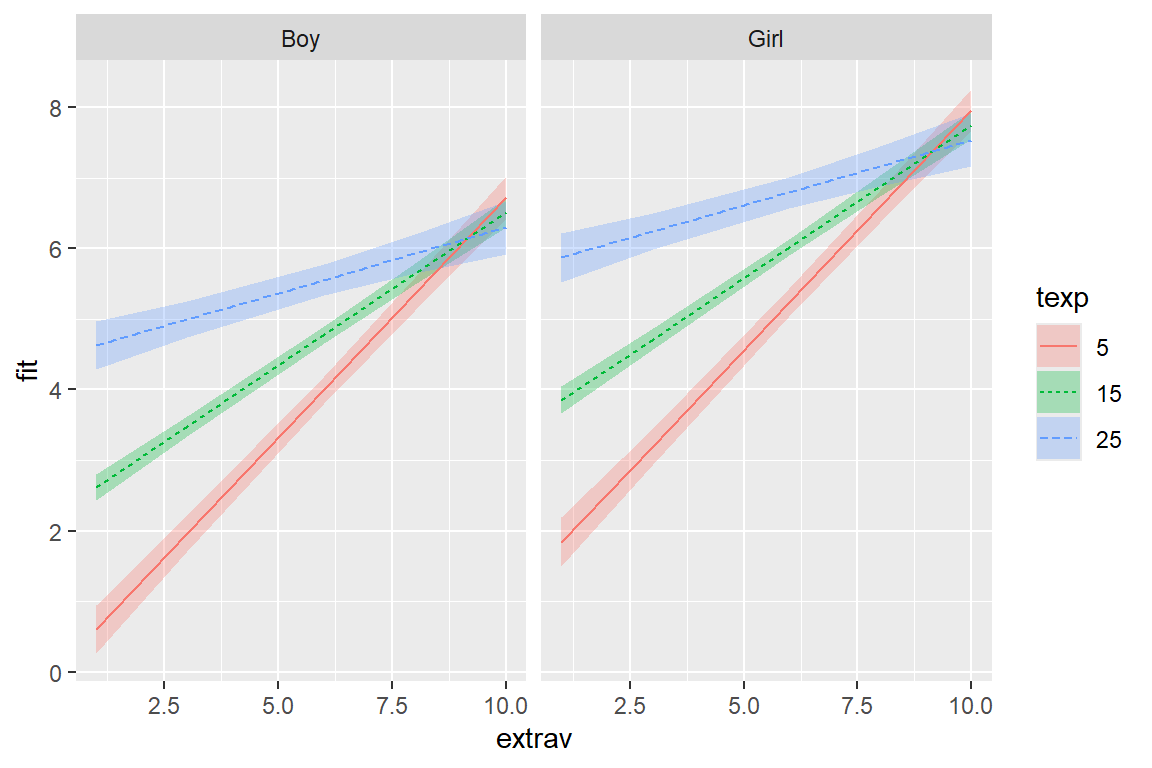
More Clean Plot
There are many ways to clean up a plot, including labeling the axes.
effects::Effect(focal.predictors = c("sex", "extrav", "texp"),
                mod = pop_lmer_2_re,
                xlevels = list(texp = c(5, 15, 25))) %>%
  data.frame() %>%
  dplyr::mutate(texp = factor(texp)) %>%
  dplyr::mutate(sex = sex %>%
                  forcats::fct_recode("Amoung Boys" = "boy",
                                      "Among Girls" = "girl")) %>%
  ggplot() +
  aes(x = extrav,
      y = fit,
      fill = texp,
      linetype = texp) +
  geom_ribbon(aes(ymin = lower,
                  ymax = upper),
              alpha = .3) +
  geom_line(aes(color = texp)) +
  theme_bw() +
  facet_grid(.~ sex) +
  labs(x = "Pupil's Extroversion, Rated by Teacher",
       y = "Estimated Marginal Mean\nPupil Popularity, Mean Rating of Classroom Peers",
       color    = "Teacher's Experience, Years",
       linetype = "Teacher's Experience, Years",
       fill     = "Teacher's Experience, Years") +
  theme(legend.position = "bottom") +
  scale_x_continuous(breaks = seq(from = 0, to = 10, by = 2))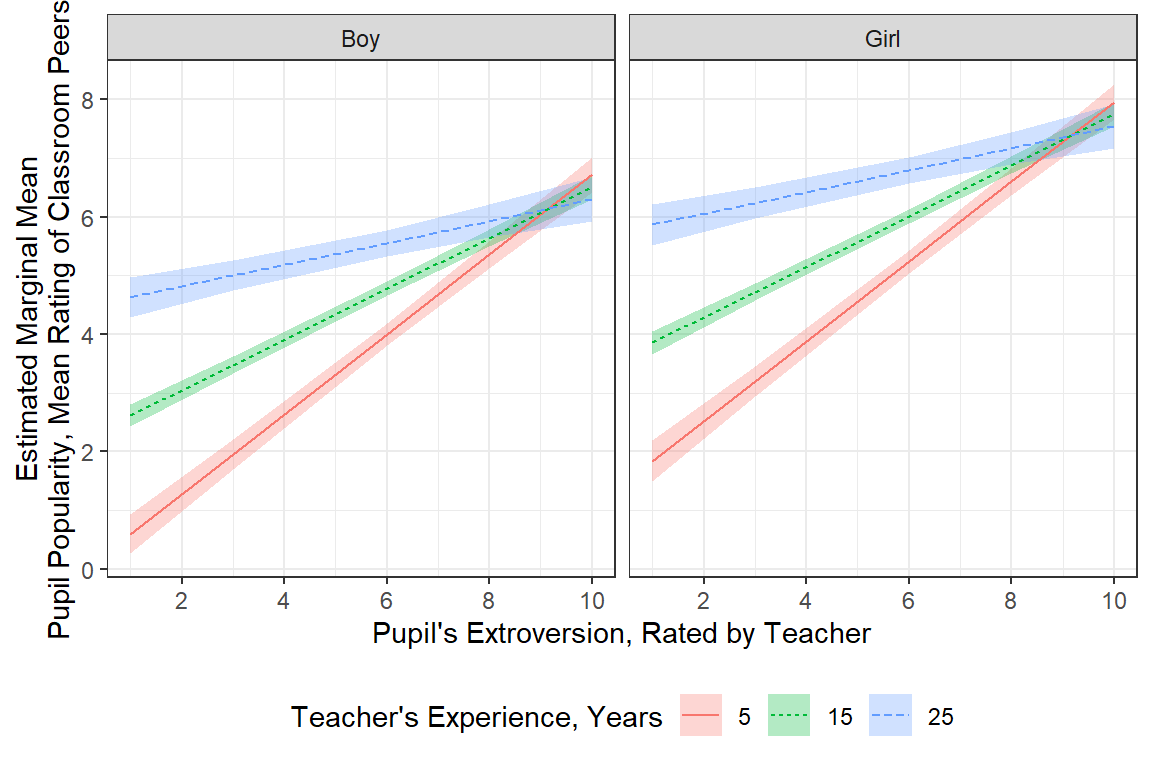
Publishable Plot
Since gender only exhibited a main effect and is not involved in any interactions, if would be a better use of space to not muddy the water with separate panels. The Effect() function will estimate the marginal means using the typical category (most common) for categorical variables and the mean for continuous variables.
effects::Effect(focal.predictors = c("extrav", "texp"),  # choose not to investigate sex (the reference category will be used)
                mod = pop_lmer_2_re,
                xlevels = list(texp = c(5, 15, 25))) %>%
  data.frame() %>%
  dplyr::mutate(texp = factor(texp) %>%
                  forcats::fct_rev()) %>%
  ggplot() +
  aes(x = extrav,
      y = fit,
      linetype = texp) +
  geom_ribbon(aes(ymin = lower,
                  ymax = upper),
              fill = "black",
              alpha = .3) +
  geom_line() +
  theme_bw() +
  labs(x = "Pupil's Extroversion, Rated by Teacher",
       y = "Estimated Marginal Mean\nPupil Popularity, Mean Rating of Classroom Peers",
       color    = "Teacher's\nExperience,\nYears",
       linetype = "Teacher's\nExperience,\nYears",
       alpha    = "Teacher's\nExperience,\nYears") +
  theme(legend.key.width = unit(2, "cm"),
        legend.background = element_rect(color = "Black"),
        legend.position = c(1, 0),
        legend.justification = c(1.1, -0.1)) +
  scale_linetype_manual(values = c("solid", "dashed", "dotted")) +
  scale_x_continuous(breaks = seq(from = 0, to = 10, by = 2)) +
scale_y_continuous(breaks = seq(from = 0, to = 10, by = 1)) 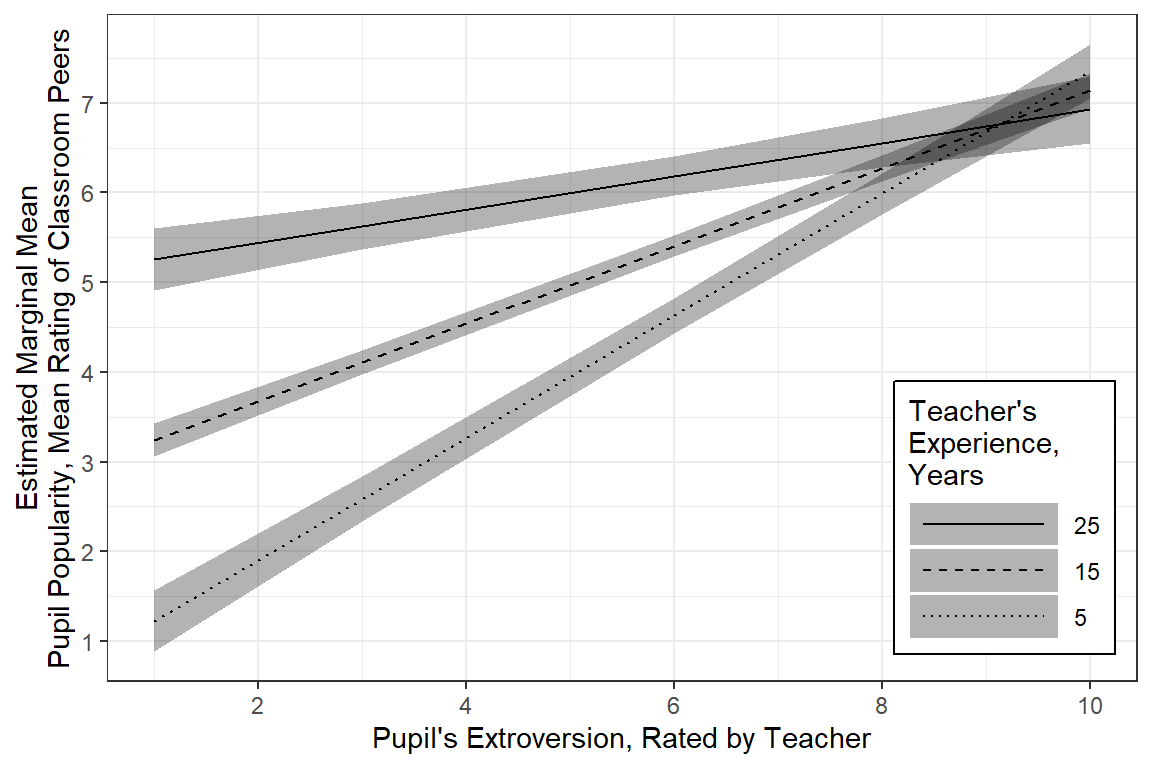
5.4.7.3 emmeans & ggplot2 packages
Get Estimated Marginal Means - default ‘nice’ predictor values:
Focal predictors: All combinations of… * sex categorical, both levels
* extrav continuous 1-10, default: 1, 3, 6, 8, 10
* texp continuous, default: 5, 15, 25
Always followed by: * emmean estimated marginal mean * SE standard error for the marginal mean * lower.CL lower end of the 95% confidence interval around the estimated marginal mean * upper.CL upper end of the 95% confidence interval around the estimated marginal mean
 sex  extrav texp emmean     SE  df lower.CL upper.CL
 Boy    5.21 14.3   4.37 0.0594 121     4.25     4.49
 Girl   5.21 14.3   5.61 0.0595 122     5.49     5.73

Degrees-of-freedom method: kenward-roger
Confidence level used: 0.95
pop_lmer_2_re %>%
emmeans::emmeans(~ sex + extrav + texp,
at = list(extrav = c(1, 3, 6, 8, 10),
texp = c(5, 15, 25))) %>%
data.frame()%>%
head(n = 12) sex extrav texp emmean SE df lower.CL upper.CL
1 Boy 1 5 0.6013149 0.17359431 116.82369 0.257515 0.9451147
2 Girl 1 5 1.8420125 0.17617285 123.86147 1.493313 2.1907118
3 Boy 3 5 1.9611907 0.12977225 121.87295 1.704291 2.2180905
4 Girl 3 5 3.2018883 0.13201549 130.69828 2.940725 3.4630521
5 Boy 6 5 4.0010044 0.09875416 95.54621 3.804967 4.1970418
6 Girl 6 5 5.2417021 0.09933619 97.56829 5.044562 5.4388424
7 Boy 8 5 5.3608803 0.11659871 67.57842 5.128185 5.5935757
8 Girl 8 5 6.6015779 0.11574073 65.04419 6.370431 6.8327251
9 Boy 10 5 6.7207561 0.15586193 61.98753 6.409191 7.0323209
10 Girl 10 5 7.9614537 0.15420428 58.98739 7.652890 8.2700172
11 Boy 1 15 2.6160080 0.09487569 97.08598 2.427708 2.8043078
12 Girl 1 15 3.8567056 0.09693759 105.12638 3.664499 4.0489122Basic, default plot
Other than selecting three illustrative values for the teacher extroversion rating, most everything is left to default.
pop_lmer_2_re %>%
  emmeans::emmeans(~ sex + extrav + texp,
                   at = list(extrav = c(1, 3, 6, 8, 10),
                             texp = c(5, 15, 25))) %>%
  data.frame() %>%
  dplyr::mutate(texp = factor(texp)) %>%
  ggplot(aes(x = extrav,
             y = emmean,
             fill = texp,
             linetype = texp)) +
  geom_ribbon(aes(ymin = lower.CL,
                  ymax = upper.CL),
              alpha = .3) +
  geom_line(aes(color = texp)) +
facet_grid(.~ sex) 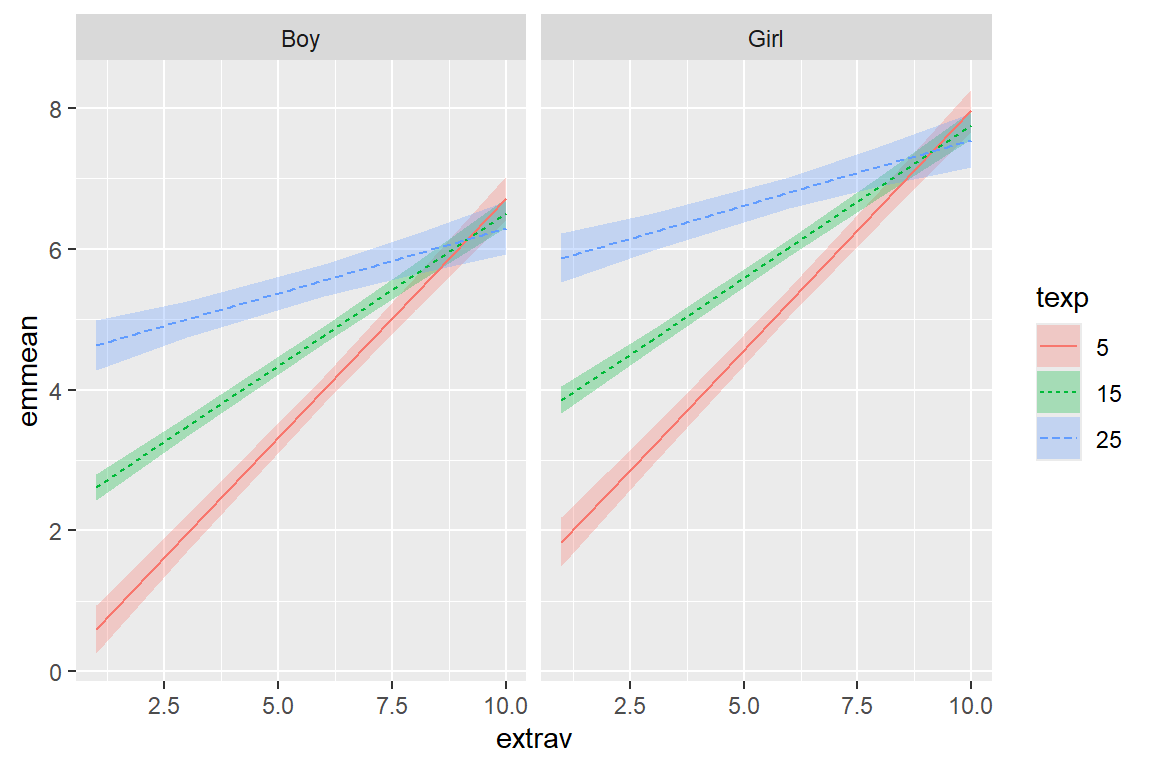
More Clean Plot
There are many ways to clean up a plot, including labeling the axes.
pop_lmer_2_re %>%
  emmeans::emmeans(~ sex + extrav + texp,
                   at = list(extrav = c(1, 3, 6, 8, 10),
                             texp = c(5, 15, 25))) %>%
  data.frame() %>%
  dplyr::mutate(texp = factor(texp)) %>%
  dplyr::mutate(sex = sex %>%
                  forcats::fct_recode("Amoung Boys" = "boy",
                                      "Among Girls" = "girl")) %>%
  ggplot(aes(x = extrav,
             y = emmean,
             fill = texp,
             linetype = texp)) +
  geom_ribbon(aes(ymin = lower.CL,
                  ymax = upper.CL),
              alpha = .3) +
  geom_line(aes(color = texp),
            linewidth = 1) +
  theme_bw() +
  facet_grid(.~ sex) +
  labs(x = "Pupil's Extroversion, Rated by Teacher",
       y = "Estimated Marginal Mean\nPupil Popularity, Mean Rating of Classroom Peers",
       color    = "Teacher's Experience, Years:",
       linetype = "Teacher's Experience, Years:",
       fill     = "Teacher's Experience, Years:") +
  theme(legend.position = "bottom",
        legend.key.width = unit(2, "cm")) +
scale_x_continuous(breaks = seq(from = 0, to = 10, by = 2)) 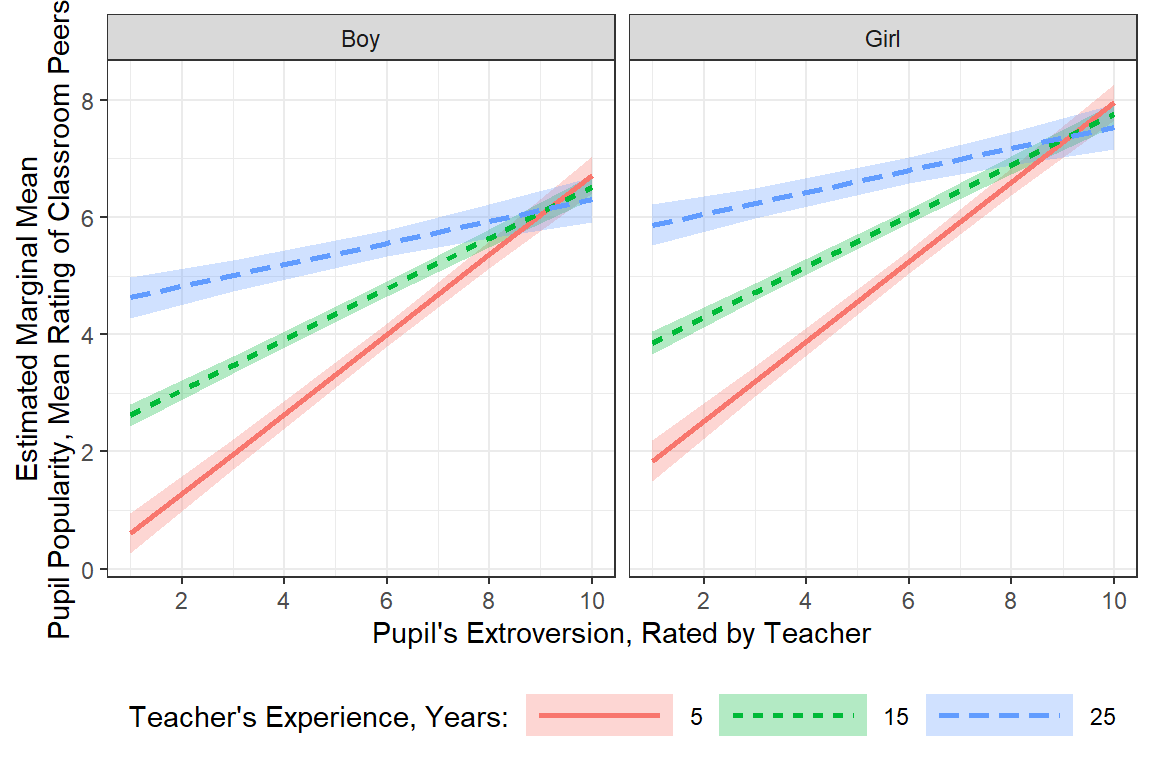
Publishable Plot
Since gender only exhibited a main effect and is not involved in any interactions, if would be a better use of space to not muddy the water with separate panels. The emmeans() function will estimate the marginal means by averaging across all levels for categorical variables and the mean for continuous variables.
pop_lmer_2_re %>%
  emmeans::emmeans(~ extrav + texp,
                   at = list(extrav = c(1, 3, 6, 8, 10),
                             texp = c(5, 15, 25))) %>%
  data.frame() %>%
  dplyr::mutate(texp = factor(texp) %>%
                  forcats::fct_rev()) %>%
  ggplot(aes(x = extrav,
             y = emmean,
             linetype = texp))  +
  geom_abline(intercept = 5,
              slope = 0,
              linewidth = 1) +
  geom_ribbon(aes(ymin = lower.CL,
                  ymax = upper.CL),
              fill = "black",
              alpha = .15) +
  geom_line(linewidth = 1) +
  theme_bw() +
  labs(x = "Pupil's Extroversion, Rated by Teacher",
       y = "Estimated Marginal Mean\nPupil Popularity, Mean Rating of Classroom Peers",
       linetype = "Teacher's\nExperience,\nYears:") +
  theme(legend.position = "inside",
        legend.position.inside = c(1, 0),
        legend.justification = c(1.1, -.1),
        legend.background = element_rect(color = "black"),
        legend.key.width = unit(2, "cm")) +
  scale_x_continuous(breaks = seq(from = 0, to = 10, by = 2)) +
  scale_y_continuous(breaks = seq(from = 0, to = 10, by = 1))  +
  scale_linetype_manual(values = c("solid", "longdash", "dotted"))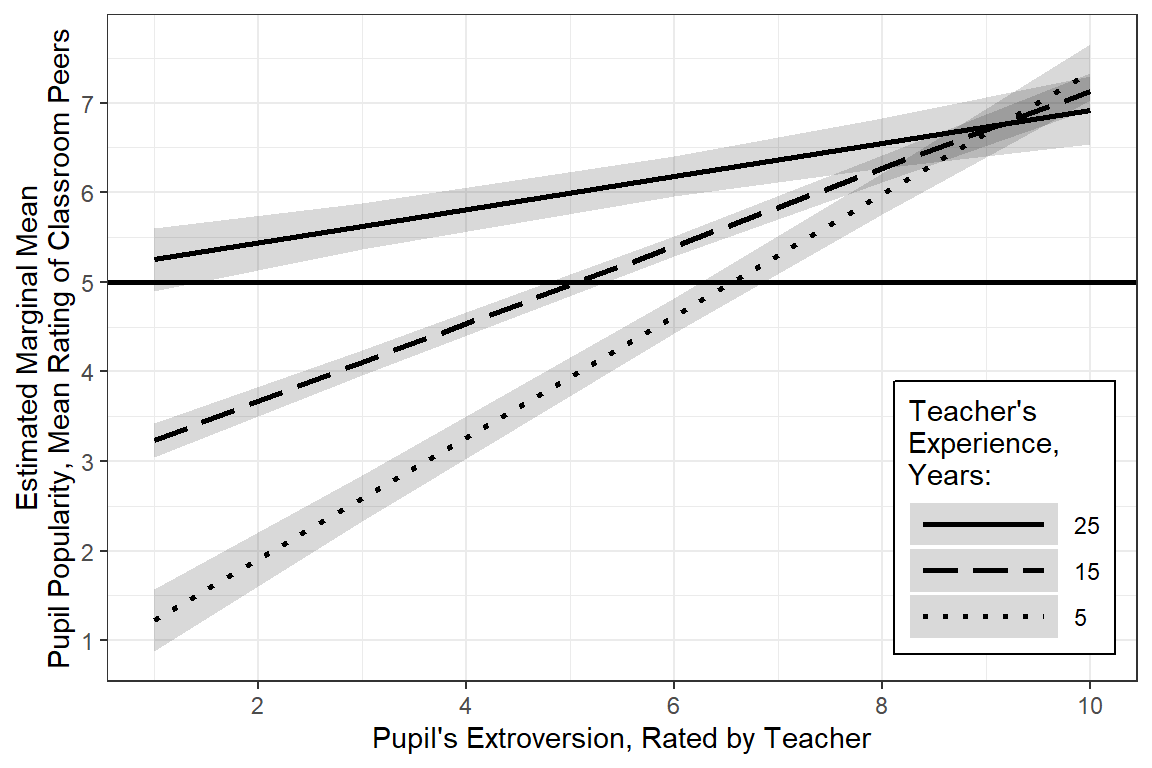
Simple Slopes
sex = Boy:
 texp extrav.trend     SE   df lower.CL upper.CL
    5        0.680 0.0293 82.5    0.622    0.738
   15        0.433 0.0176 94.7    0.398    0.468
   25        0.185 0.0329 86.9    0.120    0.251

sex = Girl:
 texp extrav.trend     SE   df lower.CL upper.CL
    5        0.680 0.0293 82.5    0.622    0.738
   15        0.433 0.0176 94.7    0.398    0.468
   25        0.185 0.0329 86.9    0.120    0.251

Degrees-of-freedom method: kenward-roger
Confidence level used: 0.95 texp extrav.trend SE df lower.CL upper.CL
5 0.680 0.0293 82.5 0.622 0.738
15 0.433 0.0176 94.7 0.398 0.468
25 0.185 0.0329 86.9 0.120 0.251
Results are averaged over the levels of: sex
Degrees-of-freedom method: kenward-roger
Confidence level used: 0.95 texp extrav.trend SE df lower.CL upper.CL
14.2 0.451 0.0175 94.3 0.417 0.486
Results are averaged over the levels of: sex
Degrees-of-freedom method: kenward-roger
Confidence level used: 0.95 For student’s who’s teacher had average experience (M = 14.25 years), a 1 unit increase in extraversion is associated with a nearly half point increase in popularity, b = 0.45, 95% CI [0.42, 0.49]. When the teacher has more experience, this association is less distinct and when teachers have more experience, this relationship is more pronounced.
5.4.8 Interpretation
After accounting for class-to-class variation and the effect of gender, a positive association was found between teacher rated extroversion and peer rated popularity. This relationship was more marked for less experienced teachers.
5.4.9 Residual Plots
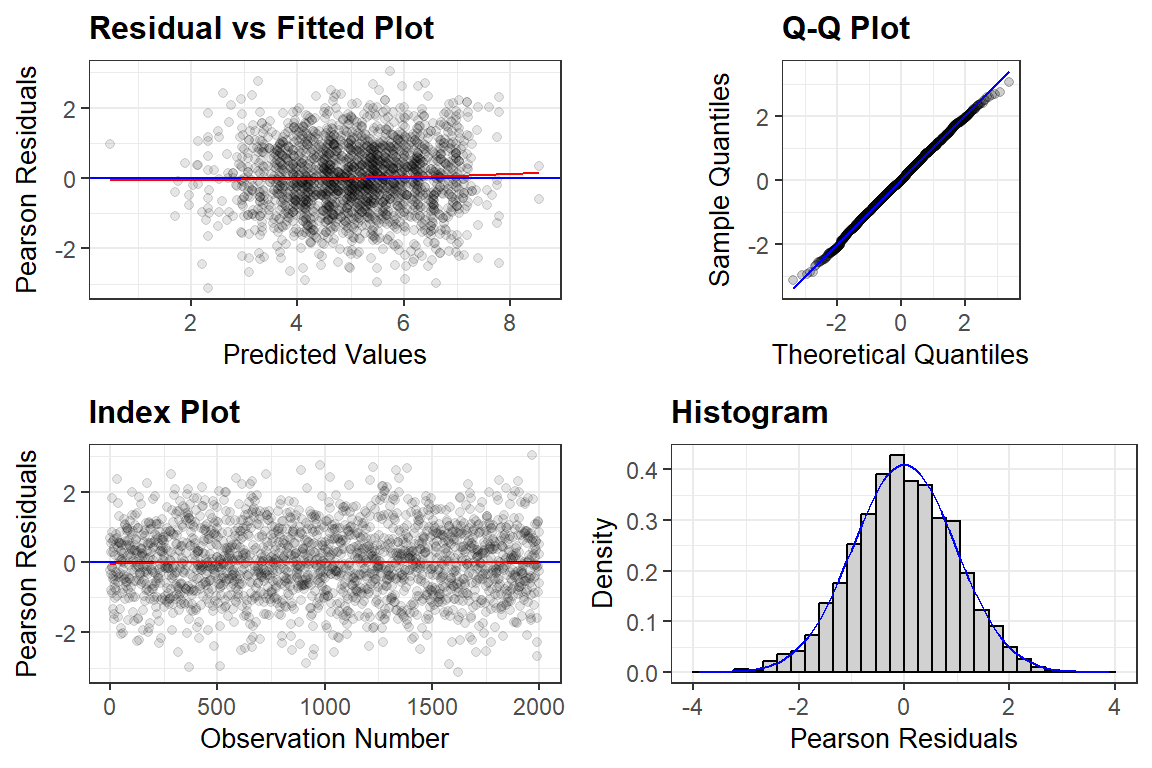
Form more infromation, see the vingette page for the redre package.
[[1]]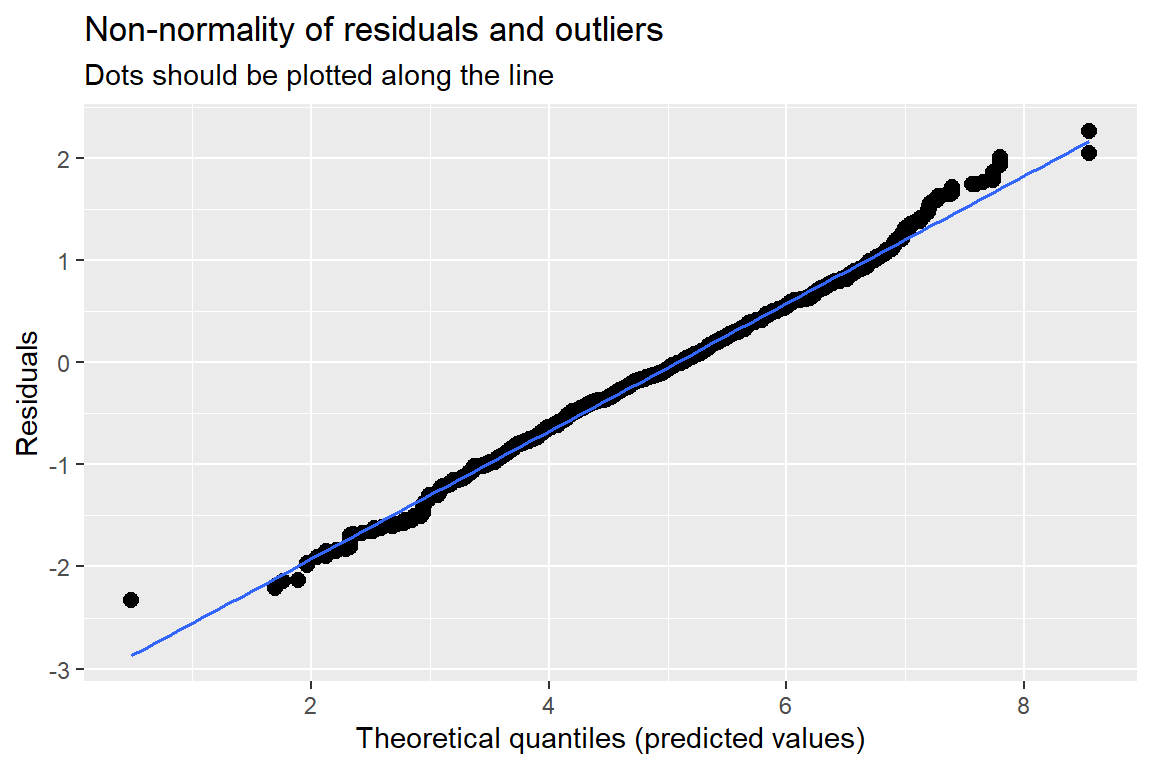
[[2]]
[[2]]$class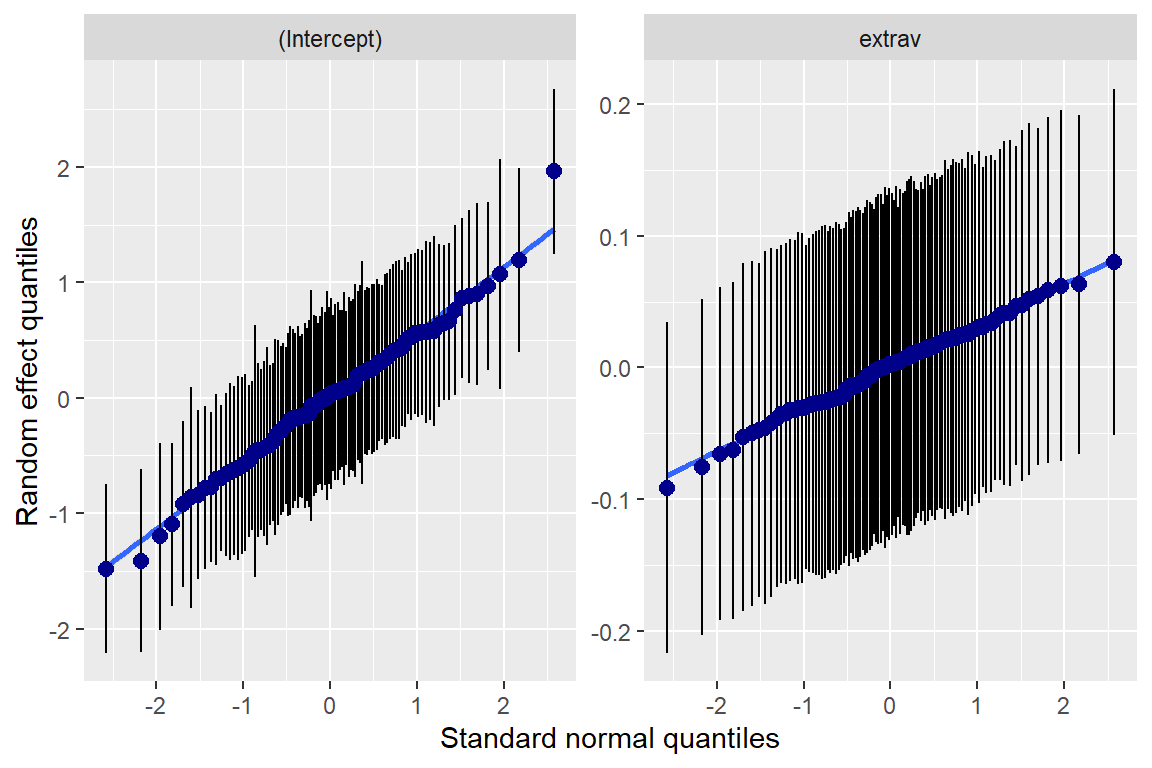
[[3]]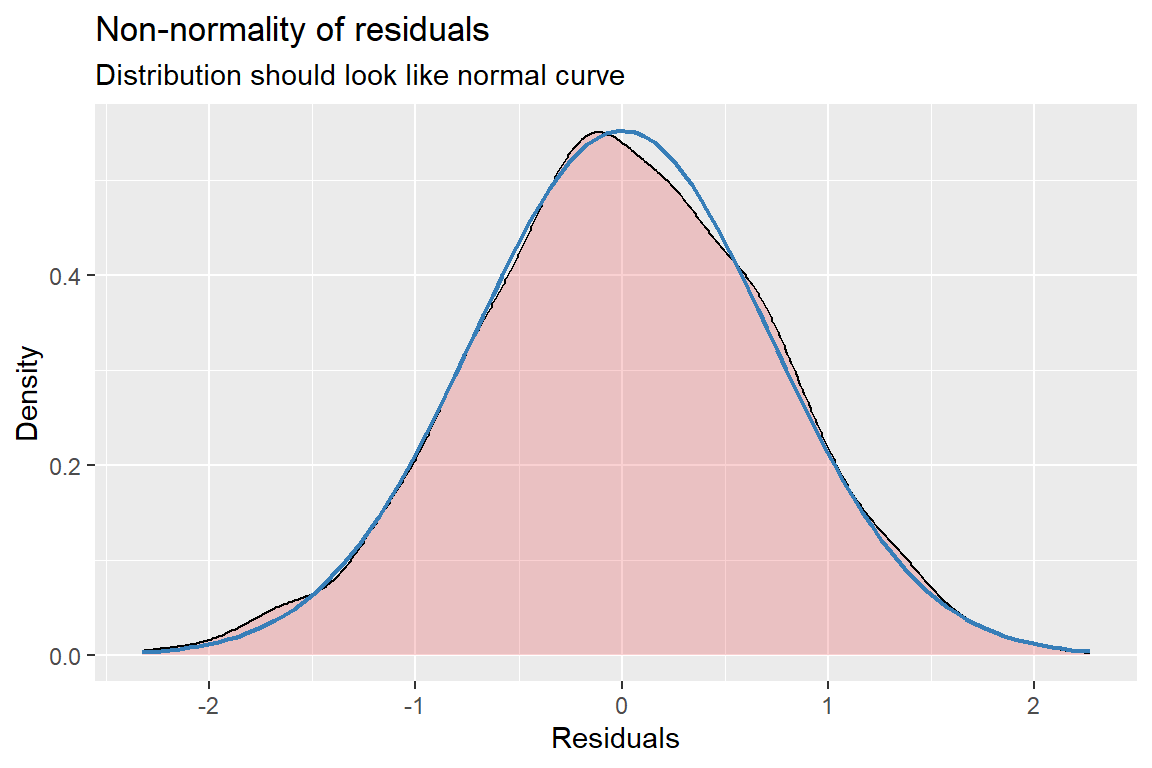
[[4]]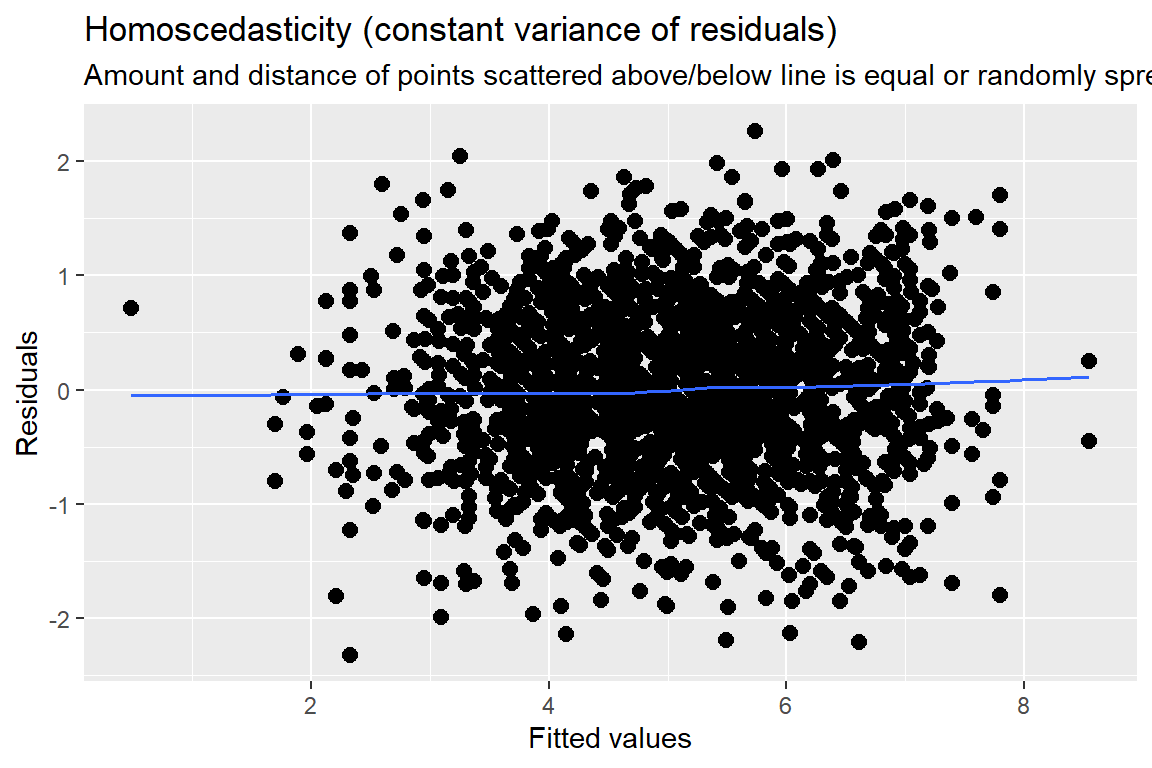
Standardized residuals vs. fitted values
You always want to use studentized, conditional residuals for MLM!
As you look across the plot, left to right:
- GOOD = no pattern & HOV
- BAD = any pattern or change in the spread
This plot looks great!